
Skip to content
mybox Help Center

Help sections

  • Getting Started
  • Account & Billing
  • Domains & DNS
  • Hosting & Servers
  • Email
  • Security & SSL
  • WordPress & CMS
  • Grow Online
mybox.com All services operational
/

Language

  • English
  • Română
  • mybox panel
  • Webmail
Start free
/
  • Getting Started
  • Account & Billing
  • Domains & DNS
  • Hosting & Servers
  • Email
  • Security & SSL
  • WordPress & CMS
  • Grow Online
  • Help Center
  • mybox.com
  • English
  • Română
All services operational Start free
  1. Help Center
  2. Domains & DNS
  3. DNS Records & DNSSEC
Problem Domains & DNS

550 SPF error received when trying to send a message

Updated February 5, 2026 1 min read

You may receive a 550 SPF error message if your domain is not configured correctly, specifically does not contain or contains an incorrectly set “SPF” (Sender Policy Framework) entry, the purpose of which is to provide additional information to the server receiving messages from you that the message was actually sent from mybox.com and there is no impersonation attempt.

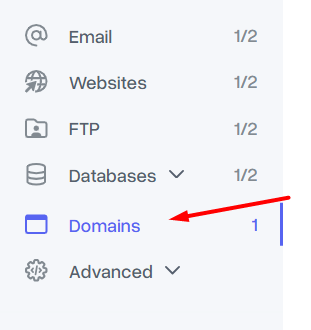
If you have parked a domain in mybox.com, the “DNS Zone” of the domain that should contain such an entry is generated automatically, so there is no need for additional configuration. The same applies to domains registered in mybox.com. Still, if you want to verify or modify entries of this type, after logging in the myBox panel, go to the “Domains” section.
550 SPF error received when trying to send a message
550 SPF error received when trying to send a message – 2

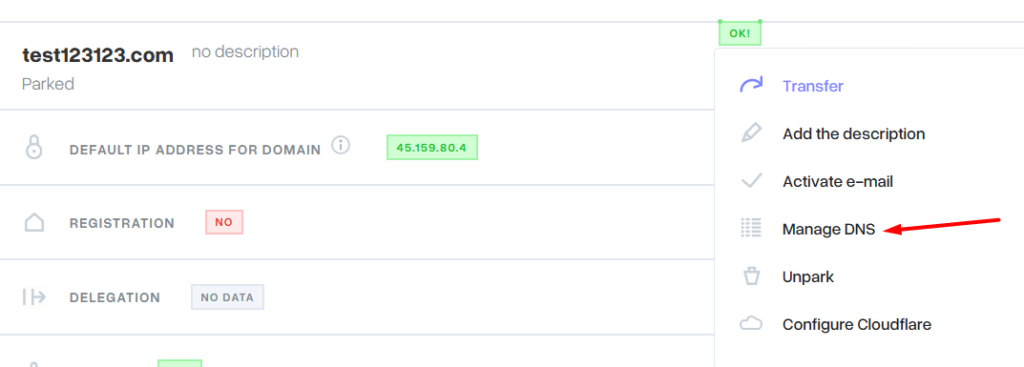
Then, from the list of domains, click on the one of your choice and go to the “Parked” tab, after which select the “Manage DNS” button

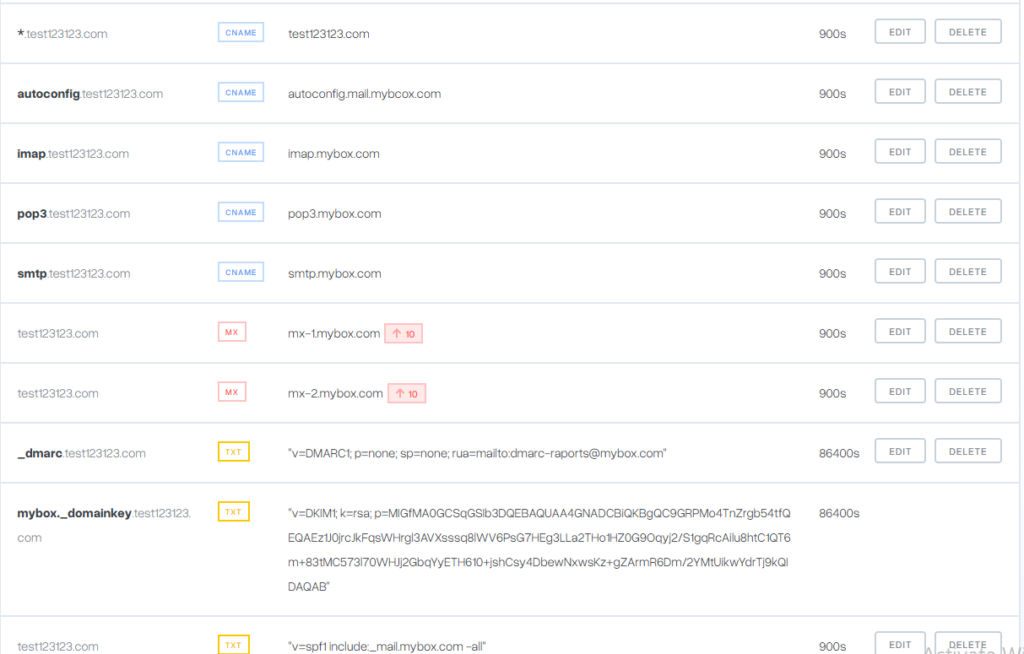
On the page that appears assuming that the domain is registered or has been parked in mybox.com and no changes have been made, you should see the following entries.
550 SPF error received when trying to send a message – 3

Make sure they match the screenshot, so the MX records are aimed at:

mx-1.mybox.com
mx-2.mybox.com

On the other hand, the SPF record is in the form of:

"v=spf1 include:_mail.mybox.com ~all"

Was this article helpful?

Didn't find an answer?

Our support team is here for you 24/7 – write to us and we will help you sort it out.

Helpdesk 24/7 Open a ticket in the mybox panel mybox panel Log in and manage your services

Related articles

All in DNS Records & DNSSEC
Explainer DNS Records & DNSSEC What is a CAA record and how does it affect SSL certificates? A CAA record is a type of DNS record that tells certificate authorities which organizations are allowed to issue SSL certificates for… 2 min read How-to Domain Management How to Add a Verification Code as a TXT Record in Your DNS Zone Many online services require domain ownership verification before certain features can be activated. A common verification method is adding a TXT record… 3 min read How-to First Email & Domain Setup Set up your domain to use email inboxes in Office 365 To use Microsoft Office 365 email services with a domain managed in the mybox panel, you need to configure DNS records correctly.… 2 min read
mybox

Modular web hosting – free out of the box, modular to grow.

Help sections

  • Getting Started
  • Account & Billing
  • Domains & DNS
  • Hosting & Servers
  • Email
  • Security & SSL
  • WordPress & CMS
  • Grow Online

mybox

  • mybox.com
  • mybox panel
  • Webmail
  • Helpdesk 24/7
© 2026 mybox 1,680 articles