
Skip to content
mybox Help Center

Help sections

  • Getting Started
  • Account & Billing
  • Domains & DNS
  • Hosting & Servers
  • Email
  • Security & SSL
  • WordPress & CMS
  • Grow Online
mybox.com All services operational
/

Language

  • English
  • Română
  • mybox panel
  • Webmail
Start free
/
  • Getting Started
  • Account & Billing
  • Domains & DNS
  • Hosting & Servers
  • Email
  • Security & SSL
  • WordPress & CMS
  • Grow Online
  • Help Center
  • mybox.com
  • English
  • Română
All services operational Start free
  1. Help Center
  2. Account & Billing
  3. Support & Account Services
Explainer Account & Billing

Contact with Customer Service via Helpdesk 24h

Updated February 23, 2026 1 min read
On this page
  1. Community support
  2. How to submit a request:
  3. Helpdesk Assistant

The fastest way to get help is through the Helpdesk 24h built into your mybox panel. Once you’re logged in, your identity is verified automatically — so you can submit a request without filling in your account details manually.

Helpdesk 24h handles questions about:

  • Technical issues – how your hosting, email, or website works
  • Service selection – help choosing the right plan or add-on
  • Billing and invoices – payments, receipts, and account charges
  • Account changes – plan upgrades, contract terms

Community support

You can also reach our team and other users through the mybox Discord channel. mybox team members actively participate in discussions – for general questions, it’s often the fastest way to get a practical answer.

For account-specific or sensitive matters, conversations may be redirected to Helpdesk 24h to ensure proper handling and data protection.

Join the mybox Discord →

Note
If you have a freemium plan(OneBox) and want human support, you will need to purchase the Hands-On Support Add-on. Check out our complete list of add-ons in the myBox store. Without a paid plan or the add-on, you will not have access to human support. However, you will receive support from our AI agent for free.

How to submit a request:

  1. Log in to your mybox panel
  2. Go to Helpdesk 24h
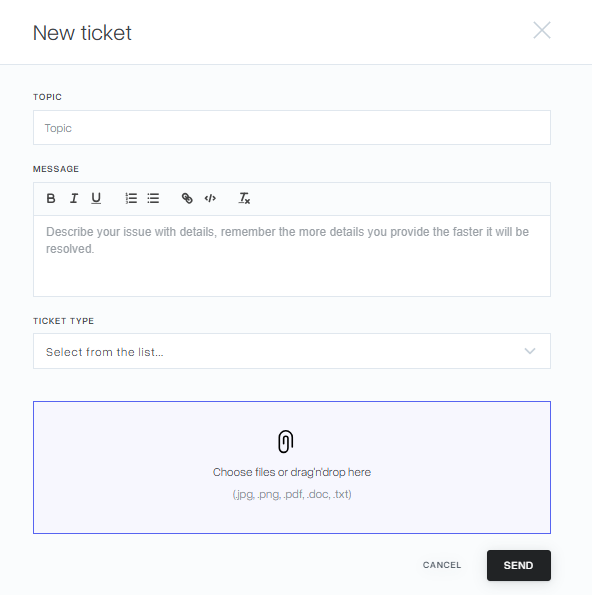
  3. Click New ticket
  4. Fill out the form and click Send

After submitting, you can track your ticket status directly in the Helpdesk 24h section. You’ll also receive a confirmation by email.
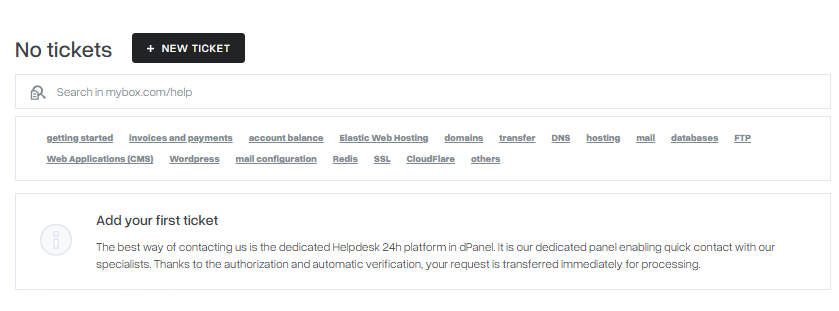
Contact with Customer Service via Helpdesk 24h
Contact with Customer Service via Helpdesk 24h – 2

Helpdesk Assistant

On the One Box plan, ticket responses are handled by Helpdesk AI Assistant — available 24/7 directly in the panel. It reads your message and responds to your question within the ticket thread.

If your issue requires human support, access to technical expert consultants is available through the Support add-on.

Was this article helpful?

Didn't find an answer?

Our support team is here for you 24/7 – write to us and we will help you sort it out.

Helpdesk 24/7 Open a ticket in the mybox panel mybox panel Log in and manage your services

On this page

  1. Community support
  2. How to submit a request:
  3. Helpdesk Assistant

Related articles

All in Support & Account Services
Problem Support & Account Services Hosting Abuse Warning Response Checklist: Evidence, Containment, Fixes, and Appeal A hosting abuse warning or suspension notice requires a prompt, documented response. Preserve evidence first. Then contain the affected website or mailbox,… 4 min read Problem Support & Account Services How to copy an error message correctly Error messages often contain important technical details that help explain why an action failed. When contacting support, copying the complete message exactly… 2 min read How-to Support & Account Services How to take a useful screenshot for support When you contact support about a website, email, or hosting issue, a screenshot can help explain what you are seeing. A clear… 2 min read
mybox

Modular web hosting – free out of the box, modular to grow.

Help sections

  • Getting Started
  • Account & Billing
  • Domains & DNS
  • Hosting & Servers
  • Email
  • Security & SSL
  • WordPress & CMS
  • Grow Online

mybox

  • mybox.com
  • mybox panel
  • Webmail
  • Helpdesk 24/7
© 2026 mybox 1,680 articles