
Detailed information about a parked domain in mybox
On this page
The Domains section in the mybox panel provides detailed information about each parked domain associated with your account.
By opening a domain’s details, you can review its registration status, delegation settings, parking configuration, email service status, and available management options.
How to view domain details
- Log in to the mybox panel
- Open the Domains section
- Click the domain name or its Status button
A detailed information page for the selected domain will be displayed.
Domain status and problems
If mybox detects configuration issues related to a domain, the standard Status button may be replaced by a Problems button.
Selecting this option displays a list of detected issues that may require attention.
Examples include:
- incorrect DNS configuration
- missing delegation
- service configuration issues
If no problems are detected, the domain is considered correctly configured.
Registration information
The Registered section displays information about domain ownership and registration status.
Here you can check:
- whether the domain is registered through the current account
- registrant information
- whether the domain can be transferred
If supported, you may also manage WHOIS privacy settings to control the visibility of registrant information in public WHOIS databases.
Delegation information
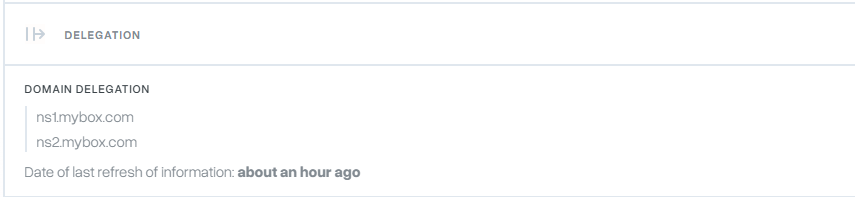
The Delegation section shows which DNS servers are responsible for the domain.
This information includes:
- active nameservers
- current delegation status
- the date of the last update
Delegation determines where DNS records are managed and how the domain resolves on the internet.
Parking information
The Parked section indicates whether the domain is currently parked on the account.
From this area, you can:
- review parking status
- manage parked domain settings
- unpark the domain if required

Email service status
The Email Service section displays whether email functionality is active for the domain.
When enabled:
- email accounts can send messages
- email accounts can receive messages
When disabled:
- email delivery and sending for that domain are unavailable
Email service status can be changed directly from the domain management interface.

Available actions

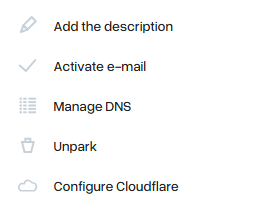
The Actions menu provides quick access to commonly used domain management functions.
Depending on your service configuration, available actions may include:
Deactivate/Activate Email
Disable email services for the selected domain.
Manage DNS
Open DNS management to view or edit DNS records.
Unpark Domain
Remove the domain from the parked state.
A domain cannot be unparked if active services are currently using it, such as:
- websites
- email accounts
These services must be removed or reassigned before unparking can be completed.
Practical implications
The domain details page serves as a central location for reviewing configuration and managing domain-related settings.
If a domain is not functioning as expected, checking its status, delegation, and service configuration is often the fastest way to identify the cause.
Summary
The parked domain details page in mybox provides access to registration information, DNS delegation, parking status, email service settings, and management actions. It also displays detected issues that may affect domain operation, helping you monitor and manage your domain from a single location.
Didn't find an answer?
Our support team is here for you 24/7 – write to us and we will help you sort it out.