
Skip to content
mybox Help Center

Help sections

  • Getting Started
  • Account & Billing
  • Domains & DNS
  • Hosting & Servers
  • Email
  • Security & SSL
  • WordPress & CMS
  • Grow Online
mybox.com All services operational
/

Language

  • English
  • Română
  • mybox panel
  • Webmail
Start free
/
  • Getting Started
  • Account & Billing
  • Domains & DNS
  • Hosting & Servers
  • Email
  • Security & SSL
  • WordPress & CMS
  • Grow Online
  • Help Center
  • mybox.com
  • English
  • Română
All services operational Start free
  1. Help Center
  2. Getting Started
  3. Getting Started with mybox
How-to Getting Started

How do I activate my email service in the mybox panel?

Updated June 8, 2026 1 min read
On this page
  1. Which DNS servers should I delegate a parked domain to?
  2. How do I modify the records in the DNS zone with my current carrier so that the email service works properly under mybox.com?

When you add or park a domain in the Mybox control panel, the email service is not activated automatically. This is because the domain must first be correctly configured to direct email traffic to Mybox mail servers.

Before activating the email service, make sure your domain’s DNS settings have been configured correctly.

Which DNS servers should I delegate a parked domain to?

To make a full delegation, at the registrar where the domain was purchased and is maintained, change the records to:

ns1.mybox.com
ns2.mybox.com

How do I modify the records in the DNS zone with my current carrier so that the email service works properly under mybox.com?

Set MX records to:

mx-1.mybox.com
mx-2.mybox.com

Set your SPF record to:

v=spf1 include:_mail.mybox.com -all

Note
Remember that changing both domain delegation and records is associated with propagation, i.e. announcing the change on the Internet. It is assumed that this process can take about 24 hours.

When you are sure that the domain is correctly directed, go to the “Domains” section in the mybox panel, click on the selected domain in the list, then expand the “Actions” item and click the “Activate e-mail” button.
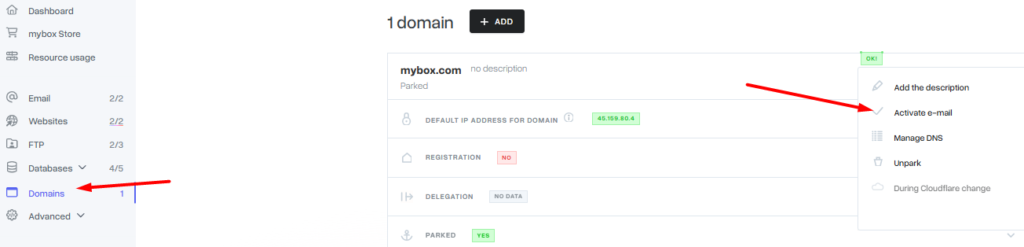
How do I activate my email service in the mybox panel?

Note
If, despite the delegation of the domain, the system communicates the inability to launch the mail service, please contact our support department.

Was this article helpful?

Didn't find an answer?

Our support team is here for you 24/7 – write to us and we will help you sort it out.

Helpdesk 24/7 Open a ticket in the mybox panel mybox panel Log in and manage your services

On this page

  1. Which DNS servers should I delegate a parked domain to?
  2. How do I modify the records in the DNS zone with my current carrier so that the email service works properly under mybox.com?

Related articles

All in Getting Started with mybox
How-to Getting Started with mybox How to migrate your website to mybox Step 1 — Get started with website migration Go to the Store in your mybox panel and activate the Website Migration add-on. 1 min read How-to Getting Started with mybox How to create your first website in mybox This article explains how to add a website to your mybox account. There are two paths: using the auto-installer to set up… 2 min read How-to Getting Started with mybox How to order a website to be transferred from another hosting At mybox, we provide comprehensive assistance with the transfer of websites and mailboxes from your current hosting provider. This migration process is… 2 min read
mybox

Modular web hosting – free out of the box, modular to grow.

Help sections

  • Getting Started
  • Account & Billing
  • Domains & DNS
  • Hosting & Servers
  • Email
  • Security & SSL
  • WordPress & CMS
  • Grow Online

mybox

  • mybox.com
  • mybox panel
  • Webmail
  • Helpdesk 24/7
© 2026 mybox 1,680 articles