
Skip to content
mybox Help Center

Help sections

  • Getting Started
  • Account & Billing
  • Domains & DNS
  • Hosting & Servers
  • Email
  • Security & SSL
  • WordPress & CMS
  • Grow Online
mybox.com All services operational
/

Language

  • English
  • Română
  • mybox panel
  • Webmail
Start free
/
  • Getting Started
  • Account & Billing
  • Domains & DNS
  • Hosting & Servers
  • Email
  • Security & SSL
  • WordPress & CMS
  • Grow Online
  • Help Center
  • mybox.com
  • English
  • Română
All services operational Start free
  1. Help Center
  2. Account & Billing
  3. Service & Resource Management
How-to Account & Billing

How do I download database copies via the mybox panel?

Updated June 7, 2026 1 min read

The mybox Panel automatically creates database backups, allowing you to download and restore previous versions of your MySQL databases when needed.

This can be useful for:

  • Recovering deleted data.
  • Restoring a website after an unsuccessful update.
  • Creating a local backup copy.
  • Troubleshooting database-related issues.
  • Migrating a website to another environment.

Steps to follow

1. In order to download a copy of the selected database in the the mybox panel (available at panel.mybox.com), select the “Databases” tab, and then “MySQL databases”.
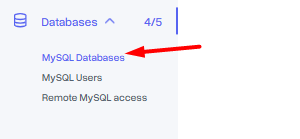
How do I download database copies via the mybox panel?

2. All databases are listed, click on the database of your choice, then select “Backups”. A list of all available backups of the selected database will appear.

3. Click “Download” next to the copy you are interested in (the exact date when the copy was made is displayed by hovering over the number of days/hours/minutes since the copy was made).

Was this article helpful?

Didn't find an answer?

Our support team is here for you 24/7 – write to us and we will help you sort it out.

Helpdesk 24/7 Open a ticket in the mybox panel mybox panel Log in and manage your services

Related articles

All in Service & Resource Management
How-to Getting Started with mybox How to order a website to be transferred from another hosting At mybox, we provide comprehensive assistance with the transfer of websites and mailboxes from your current hosting provider. This migration process is… 2 min read How-to Getting Started with mybox Ordering a website and email migration to mybox The mybox team can migrate your website and email from your current hosting provider. To request a migration, you need to activate… 1 min read How-to Getting Started with mybox How to migrate a website to mybox Migrating a website to mybox means copying your files, database, and email content from your current hosting provider and pointing your domain… 2 min read
mybox

Modular web hosting – free out of the box, modular to grow.

Help sections

  • Getting Started
  • Account & Billing
  • Domains & DNS
  • Hosting & Servers
  • Email
  • Security & SSL
  • WordPress & CMS
  • Grow Online

mybox

  • mybox.com
  • mybox panel
  • Webmail
  • Helpdesk 24/7
© 2026 mybox 1,680 articles