
How to create a new FTP account?
On this page
An FTP (File Transfer Protocol) account allows you to connect to your server to upload, download, and manage your website files. By creating dedicated FTP accounts, you can securely access your hosting environment using external applications.
Context
FTP accounts are the primary way to move large amounts of data between your local computer and the mybox infrastructure. While your main account has administrative access, creating individual FTP accounts allows you to provide specific access to developers or separate projects without sharing your primary credentials.
Step-by-Step Configuration
To create a new FTP account, follow these steps in your dashboard:
- Navigate to FTP: Select the FTP tab from the left-hand menu.
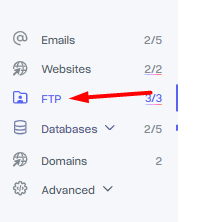
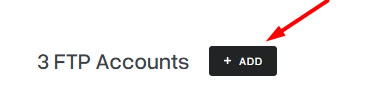
- Initiate Setup: At the top of the page, click the + Add button.
- Define Credentials:
- Username: Enter your desired name. Note that a non-editable prefix is automatically added to ensure your username is unique across our network.
- Password: Enter a strong, unique password for this specific FTP account.
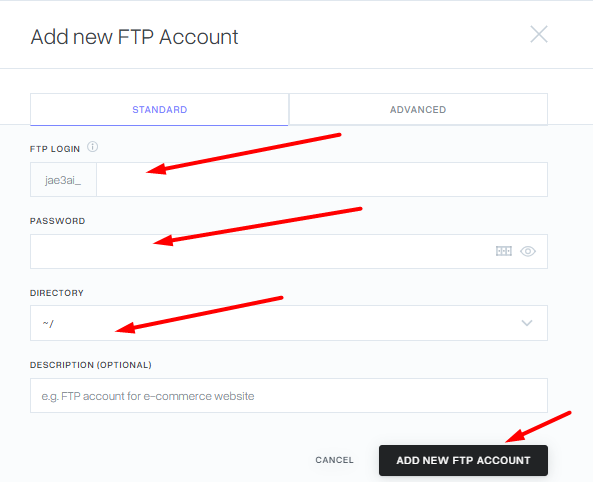
- Confirm: Click the Add FTP account button. Your account is now active and ready for use.
Distinction: FTP vs. SFTP
- FTP: The standard protocol for transferring files. It is widely supported by all web development tools.
- SFTP (Secure FTP): A more secure version that encrypts the connection. mybox supports both; however, using SFTP is recommended for better security when handling sensitive website data.
Practical Implications
- Connecting to your server: Once the account is created, you can use any FTP client to connect. We provide specific configuration guides for popular tools like FileZilla and WinSCP.
- Connection Details: To connect, you will typically need your Hostname (found in the “Additional Information” section of your panel), your Username (including the prefix), and your Password.
- Directory Limits: By default, new FTP accounts have access to your entire web directory. If you are working with a third-party developer, ensure you only provide the credentials for the specific account they need to access.
Summary
Creating an FTP account is the first step in managing your website’s file structure. By using the mybox panel to generate unique credentials, you maintain a secure and organized workflow for all your file transfers.
Didn't find an answer?
Our support team is here for you 24/7 – write to us and we will help you sort it out.