
Skip to content
mybox Help Center

Help sections

  • Getting Started
  • Account & Billing
  • Domains & DNS
  • Hosting & Servers
  • Email
  • Security & SSL
  • WordPress & CMS
  • Grow Online
mybox.com All services operational
/

Language

  • English
  • Română
  • mybox panel
  • Webmail
Start free
/
  • Getting Started
  • Account & Billing
  • Domains & DNS
  • Hosting & Servers
  • Email
  • Security & SSL
  • WordPress & CMS
  • Grow Online
  • Help Center
  • mybox.com
  • English
  • Română
All services operational Start free
  1. Help Center
  2. Email
  3. Spam, Security & Deliverability
How-to Email

How to use whitelists and blacklists in email inboxes?

Updated February 13, 2026 1 min read
On this page
  1. What is the black and white list?
  2. How can you define a global list in your account?
  3. Can the list be managed by the user of a given mailbox himself?

In a situation where you receive unsolicited messages, the so-called spam, you have the opportunity to take action yourself from the level of our systems.
Both in the mybox panel and on the webmail side, mail.mybox.com you have a number of options that can help in this regard. One of them is the black and white list of recipients.

What is the black and white list?

This is a list of authorized (white) or blocked (black) senders.

Remark
Messages from blacklisted senders will be filtered out and placed in the SPAM folder (accessible via IMAP).

How can you define a global list in your account?

Once you’ve logged in to the mybox panel, go to the “Email” section, and at the bottom of the page with the list of mailboxes that will load, select the “Global lists (black/white)”.
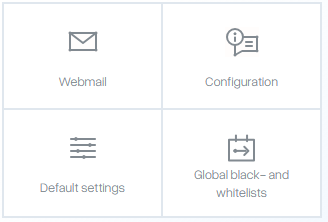
How to use whitelists and blacklists in email inboxes?

On the next page, you will find a list of already defined rules and a “+ Add” button that will allow you to add more items.
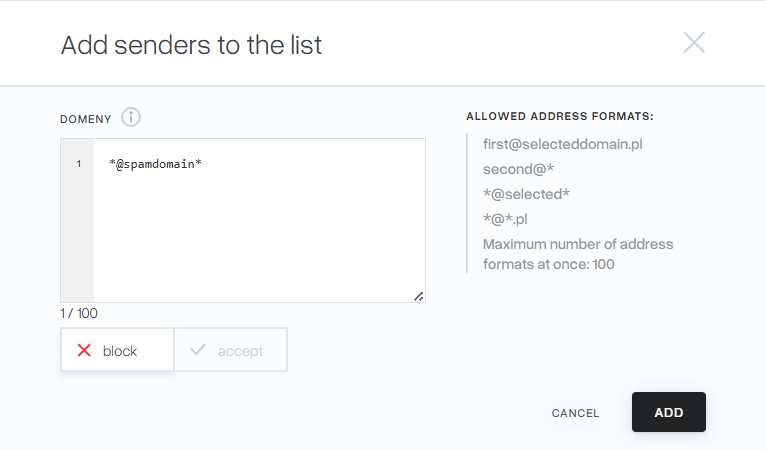
How to use whitelists and blacklists in email inboxes? – 2

The principle is simple. In the first field, you specify the sender, where it can be either a specific e-mail address, or using an asterisk * indicating the so-called wildcard, to indicate that you wish (by adding to the white list) or do not wish (adding to the black list) to receive messages from a given sender.

Allowed address formats:
Address@exampledomain.com
addressi@*
*@exampledomain.com
*@example*
*@*.com

Can the list be managed by the user of a given mailbox himself?

Yes – you can do this by logging directly into WebMail at mail.mybox.com. Go to “Settings”, then select “Cleanbox” and “Address Rules”.

There, on a similar principle to the one described above, you add rules from which recipients you wish to receive messages, from which you do not, and in such a situation, they are to go to the Spam directory.

Was this article helpful?

Didn't find an answer?

Our support team is here for you 24/7 – write to us and we will help you sort it out.

Helpdesk 24/7 Open a ticket in the mybox panel mybox panel Log in and manage your services

On this page

  1. What is the black and white list?
  2. How can you define a global list in your account?
  3. Can the list be managed by the user of a given mailbox himself?

Related articles

All in Spam, Security & Deliverability
Explainer Spam, Security & Deliverability Why Does a Contact Form Say an Email Was Sent When Nothing Arrives? A website contact form may display a success message even though the intended recipient never receives an email. 4 min read Problem Spam, Security & Deliverability Why Can Some Recipients Receive My Emails While Others Cannot? An email sent from your domain may arrive successfully at one recipient while being rejected, delayed, or filtered by another. 4 min read Problem Spam, Security & Deliverability How to Diagnose DKIM Failures and DMARC Alignment Problems DKIM (DomainKeys Identified Mail) and DMARC (Domain-based Message Authentication, Reporting, and Conformance) help receiving mail servers verify the authenticity of incoming messages. 4 min read
mybox

Modular web hosting – free out of the box, modular to grow.

Help sections

  • Getting Started
  • Account & Billing
  • Domains & DNS
  • Hosting & Servers
  • Email
  • Security & SSL
  • WordPress & CMS
  • Grow Online

mybox

  • mybox.com
  • mybox panel
  • Webmail
  • Helpdesk 24/7
© 2026 mybox 1,680 articles