
Skip to content
mybox Help Center

Help sections

  • Getting Started
  • Account & Billing
  • Domains & DNS
  • Hosting & Servers
  • Email
  • Security & SSL
  • WordPress & CMS
  • Grow Online
mybox.com All services operational
/

Language

  • English
  • Română
  • mybox panel
  • Webmail
Start free
/
  • Getting Started
  • Account & Billing
  • Domains & DNS
  • Hosting & Servers
  • Email
  • Security & SSL
  • WordPress & CMS
  • Grow Online
  • Help Center
  • mybox.com
  • English
  • Română
All services operational Start free
  1. Help Center
  2. Email
  3. WebMail mail.mybox.com
How-to Email

Import and export contacts in mail.mybox.com

Updated June 8, 2026 1 min read
On this page
  1. Accessing Contact Import and Export
  2. Supported Import Formats
  3. Importing Contacts
  4. Exporting Contacts
  5. Example CSV File Format
  6. Common Uses
  7. Summary

If you want to import or export contacts in Mybox webmail, log in to your account and open the Contacts section.

Accessing Contact Import and Export

After opening the Contacts section, look for the cloud icons located in the toolbar at the top of the page.

These options allow you to:

  • Import contacts into your address book
  • Export existing contacts from your address book
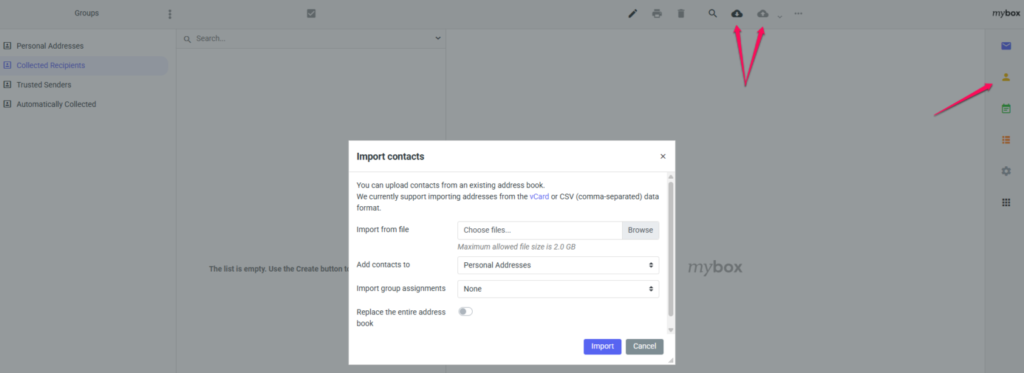
Import and export contacts in mail.mybox.com

Supported Import Formats

Currently, Mybox webmail supports importing contacts in the following formats:

  • vCard (.vcf)
  • CSV (Comma-Separated Values)

Importing Contacts

  1. Open the Contacts section.
  2. Click the Import icon.
  3. Select the contact file from your computer.
  4. Confirm the import process.

The contacts will be added to your address book automatically.

Exporting Contacts

  1. Open the Contacts section.
  2. Click the Export icon.
  3. Choose the desired export format if prompted.
  4. Download the generated contact file.

You can then use this file as a backup or import it into another email application or service.

Example CSV File Format

When importing contacts from a CSV file, the file should follow the format shown below:

First Name,Last Name,E-mail Address
John,Doe,john@example.com
Jane,Smith,jane@example.com

Make sure:

  • The first row contains column headers.
  • Email addresses are valid.
  • Fields are separated by commas.
  • The file is saved in CSV format.

Common Uses

Importing and exporting contacts can be useful when:

  • Migrating to a new email provider
  • Creating a backup of your address book
  • Synchronizing contacts between applications
  • Importing contacts from Outlook, Thunderbird, or another mail service

Summary

Mybox webmail allows you to easily import and export contacts directly from the Contacts section. Supported import formats include vCard (.vcf) and CSV, making it simple to transfer address books between different email platforms and applications.

Was this article helpful?

Didn't find an answer?

Our support team is here for you 24/7 – write to us and we will help you sort it out.

Helpdesk 24/7 Open a ticket in the mybox panel mybox panel Log in and manage your services

On this page

  1. Accessing Contact Import and Export
  2. Supported Import Formats
  3. Importing Contacts
  4. Exporting Contacts
  5. Example CSV File Format
  6. Common Uses
  7. Summary

Related articles

All in WebMail mail.mybox.com
How-to WebMail mail.mybox.com How do I set up two-step verification in Webmail? Security is a priority today, and two-step verification, which requires not only knowing and providing a password, but also a one-time code,… 2 min read How-to WebMail mail.mybox.com How to change your email password in WebMail The mailbox password can be changed directly in webmail at mail.mybox.com — without accessing the mybox panel. This is useful when the… 1 min read Explainer WebMail mail.mybox.com What Is Webmail? Webmail is a web-based interface that allows users to access, send, receive, and manage email messages directly through a web browser without… 2 min read
mybox

Modular web hosting – free out of the box, modular to grow.

Help sections

  • Getting Started
  • Account & Billing
  • Domains & DNS
  • Hosting & Servers
  • Email
  • Security & SSL
  • WordPress & CMS
  • Grow Online

mybox

  • mybox.com
  • mybox panel
  • Webmail
  • Helpdesk 24/7
© 2026 mybox 1,680 articles