
Parking a domain in mybox
Parking a domain means connecting a domain you already own to your mybox account. Once parked, you can configure your website and email settings in the mybox panel — before changing the domain’s nameservers. This lets you prepare everything in advance and switch traffic over when you’re ready, without any interruption to your current setup.
How to park a domain
Step 1 — Go to the Domains section Log in to your mybox panel and open the Domains section.
Step 2 — Add a parked domain Click +Add and select Park domain from the list.
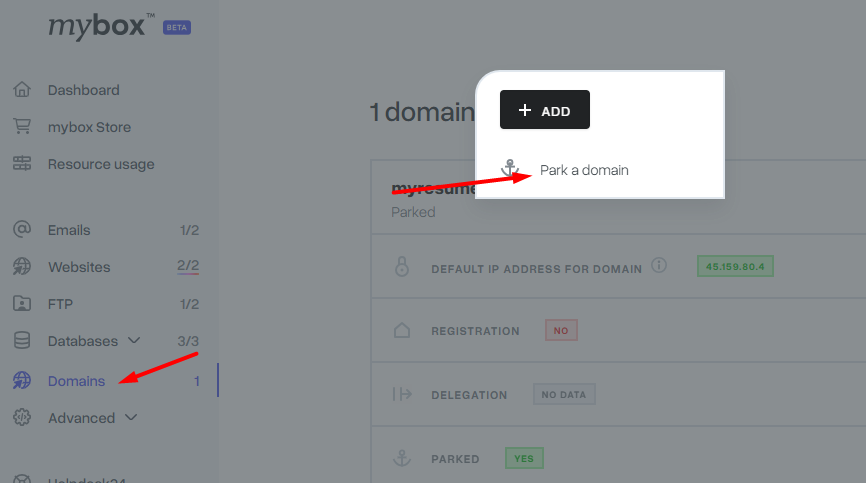
Step 3 — Enter your domain name Type your domain name and click “Park a domain” to confirm.
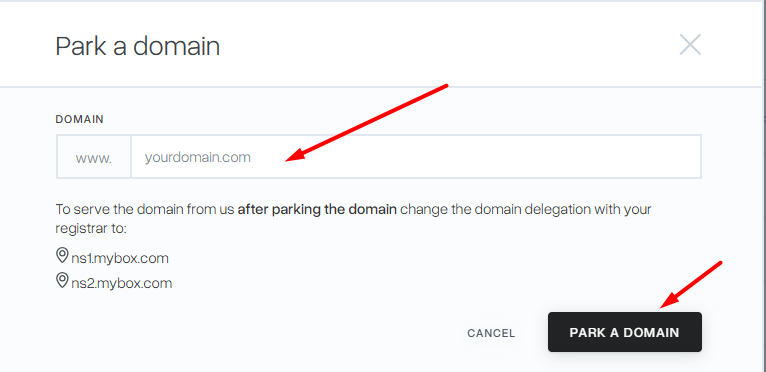
Step 4 — Update your nameservers Log in to your domain registrar’s panel (wherever you registered the domain) and update the nameservers to:
ns1.mybox.com
ns2.mybox.com
After the nameserver change, DNS propagation typically takes a few hours, though in some cases it can take up to 24 hours. During this time, your domain may resolve inconsistently depending on location.
Didn't find an answer?
Our support team is here for you 24/7 – write to us and we will help you sort it out.