
Skip to content
mybox Help Center

Help sections

  • Getting Started
  • Account & Billing
  • Domains & DNS
  • Hosting & Servers
  • Email
  • Security & SSL
  • WordPress & CMS
  • Grow Online
mybox.com All services operational
/

Language

  • English
  • Română
  • mybox panel
  • Webmail
Start free
/
  • Getting Started
  • Account & Billing
  • Domains & DNS
  • Hosting & Servers
  • Email
  • Security & SSL
  • WordPress & CMS
  • Grow Online
  • Help Center
  • mybox.com
  • English
  • Română
All services operational Start free
  1. Help Center
  2. Email
  3. Email Troubleshooting
Problem Email

Possible reasons for message failure

Updated February 6, 2026 1 min read
On this page
  1. Account issues
  2. Exceeded Mailbox Quota
  3. Connection Time Exceeded
  4. Sender Verification Error

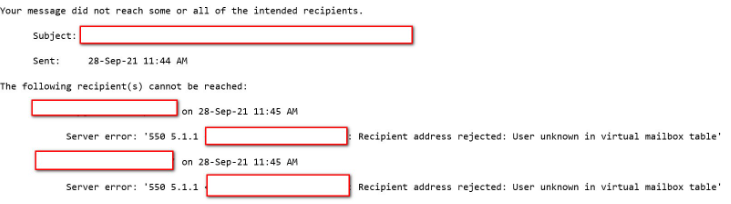
In many cases, if your message cannot be delivered to the recipient, you will receive an automatic return email, which will include, among other things, the reason for the non-delivery.
Possible reasons for message failure

Below you will find the most common mistakes in delivering emails to recipients.

Account issues

The most common reason for errors marked as “Recipent address rejected” is an incorrectly entered recipient address. Perhaps a typo crept in when typing it or the box to which you want to send your message simply does not exist.

Exceeded Mailbox Quota
Possible reasons for message failure – 2

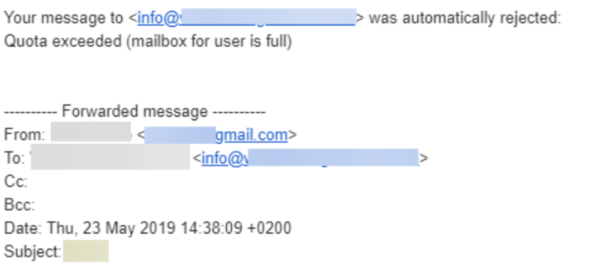
When “Mailbox is over quota” appears in the return email after sending a message, it means that the recipient’s inbox is overfilled and cannot accept your email.

Connection Time Exceeded

If you find the phrase “Connection timed out” in the return message, it means that our servers were unable to connect to the recipient’s infrastructure. In this case, we will try to deliver the message a few more times. Perhaps at some point the message will be delivered.

If after several attempts the shipment still does not take place, you will receive a notification of failure. In this case, be sure to contact the Customer Service Office via the Helpdesk 24h or by phone.

Sender Verification Error

When you see the message “5.7.8 Error: authentication failed: authentication failure” after sending the message, it probably means that you have saved the wrong login details for mybox.com mail servers in your email client. Verify that the mailbox password you entered is correct.

Was this article helpful?

Didn't find an answer?

Our support team is here for you 24/7 – write to us and we will help you sort it out.

Helpdesk 24/7 Open a ticket in the mybox panel mybox panel Log in and manage your services

On this page

  1. Account issues
  2. Exceeded Mailbox Quota
  3. Connection Time Exceeded
  4. Sender Verification Error

Related articles

All in Email Troubleshooting
Problem Email Troubleshooting How to Fix SMTP Authentication Failed Errors in Email Clients An SMTP authentication failure occurs when an email client cannot verify your credentials with the outgoing mail server. This typically prevents you… 2 min read Explainer Email Client Configuration OAuth Sign-In Loops in Outlook, Apple Mail, and Thunderbird: Causes and Fixes An OAuth sign-in loop occurs when Outlook, Apple Mail, Thunderbird, or another email client repeatedly opens a sign-in window, rejects credentials that… 4 min read Explainer Email Client Configuration Email Client Keeps Going Offline or Disconnecting: Causes and Fixes If Outlook, Apple Mail, Thunderbird, or another email client keeps switching to offline mode or losing its connection, the cause is usually… 3 min read
mybox

Modular web hosting – free out of the box, modular to grow.

Help sections

  • Getting Started
  • Account & Billing
  • Domains & DNS
  • Hosting & Servers
  • Email
  • Security & SSL
  • WordPress & CMS
  • Grow Online

mybox

  • mybox.com
  • mybox panel
  • Webmail
  • Helpdesk 24/7
© 2026 mybox 1,680 articles