
Trouble searching for emails
If you’re having difficulty finding messages in your mailbox, the issue is often related to the mailbox search index or search settings. This is especially common in mailboxes that contain a large number of emails.
The following troubleshooting steps can help restore proper search functionality.
Rebuild the Mailbox Index
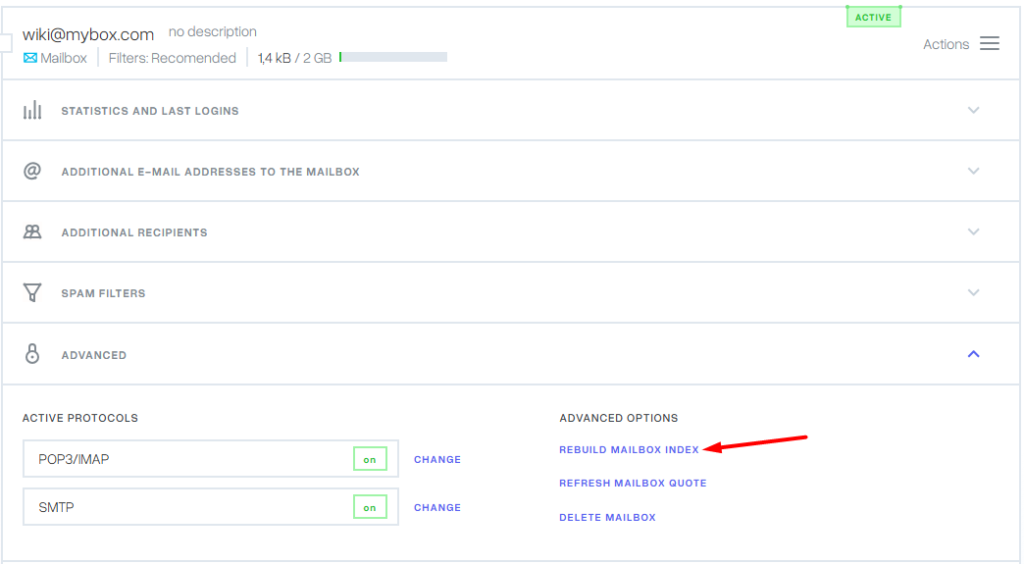
The mailbox index is used by the search engine to quickly locate messages. If the index becomes outdated or corrupted, searches may return incomplete or inaccurate results.
To rebuild the mailbox index:
- Log in to your MyBox control panel.
- Open the email mailbox that is experiencing search issues.
- Navigate to the Advanced section.
- Select Rebuild Mailbox Index.
Once the rebuild process has started, allow approximately 30 minutes for it to complete.
After the waiting period, test the search function again. If the problem persists, repeat the rebuild process up to two additional times, leaving at least 30 minutes between each attempt.
In many cases, rebuilding the index resolves search-related issues and restores accurate results.
Adjust Search Settings in Webmail
If rebuilding the index does not help, review the search options configured in webmail.
To do this:
- Log in to your MyBox webmail account.
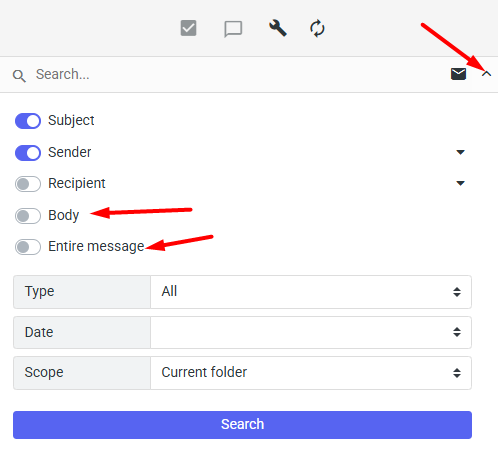
- Click the arrow next to the search field to expand the advanced search options.
- Review the enabled search criteria.
- Disable the following options:
- Body
- Entire Message
Searching the full content of every message can significantly increase search complexity and may affect performance in large mailboxes.
After disabling these options, perform the search again and verify whether the results have improved.
Additional Tips
If you continue to experience search issues:
- Verify that the mailbox is not approaching its storage limit.
- Try searching using more specific keywords.
- Test the search function in a different browser.
- Clear your browser cache and cookies before testing again.
Conclusion
Search problems are often caused by an outdated mailbox index or overly broad search settings. Rebuilding the mailbox index and limiting searches to message headers, subjects, or senders can significantly improve search performance and accuracy.
If the issue continues after following these steps, contact your email hosting provider’s support team for further investigation.
Didn't find an answer?
Our support team is here for you 24/7 – write to us and we will help you sort it out.