Skip to content
mybox Help Center

Help sections

  • Getting Started
  • Account & Billing
  • Domains & DNS
  • Hosting & Servers
  • Email
  • Security & SSL
  • WordPress & CMS
  • Grow Online
mybox.com All services operational
/

Language

  • English
  • Română
  • mybox panel
  • Webmail
Start free
/
  • Getting Started
  • Account & Billing
  • Domains & DNS
  • Hosting & Servers
  • Email
  • Security & SSL
  • WordPress & CMS
  • Grow Online
  • Help Center
  • mybox.com
  • English
  • Română
All services operational Start free
  1. Help Center
  2. Email
  3. Spam, Security & Deliverability
Explainer Email

What is CleanBox?

Updated February 20, 2026 1 min read
On this page
  1. How CleanBox Works
  2. Protection Levels
  3. What CleanBox covers

CleanBox is mybox’s built-in anti-spam system. It filters incoming email automatically — no configuration required. The system uses a combination of traditional filtering rules, heuristic analysis, and machine learning to detect spam, phishing attempts, and malicious content before messages reach your inbox.

How CleanBox Works

CleanBox analyses each incoming message on multiple levels. It evaluates not only the content of the message, but also the context — whether the sender is someone you’ve corresponded with before, whether the message is part of an ongoing thread, and whether the sender’s infrastructure (MX records, SPF, hostname) is correctly configured.

One key feature is the ability to block spam at the SMTP connection stage — before the message is accepted by the server. CleanBox also expands shortened URLs, checks redirects, and evaluates link destinations to detect phishing and spoofed domains.

Contacts with whom you actively correspond are automatically trusted, which reduces the risk of legitimate messages being incorrectly marked as spam.

Protection Levels

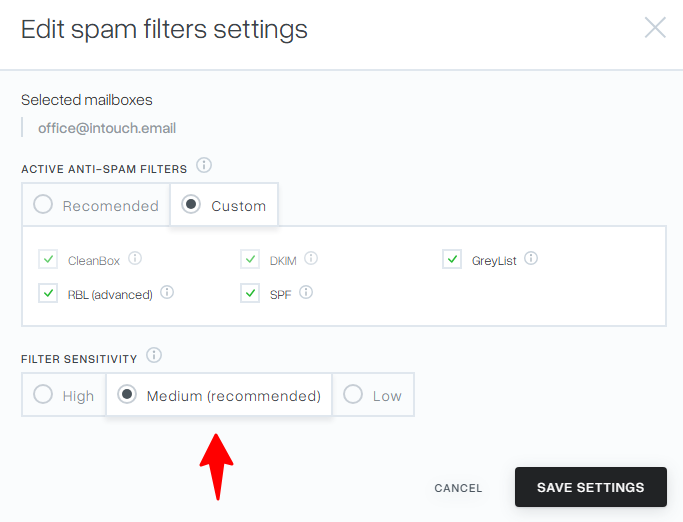
Instead of a manual scoring system, CleanBox offers three straightforward protection levels:

  • Low — maximum openness, minimal filtering. Suitable if you want to receive all messages and manage filtering manually.
  • Medium — balanced filtering. Recommended for most users.
  • High — strict filtering. Suitable if you want to minimise spam at the cost of occasionally filtering edge cases.

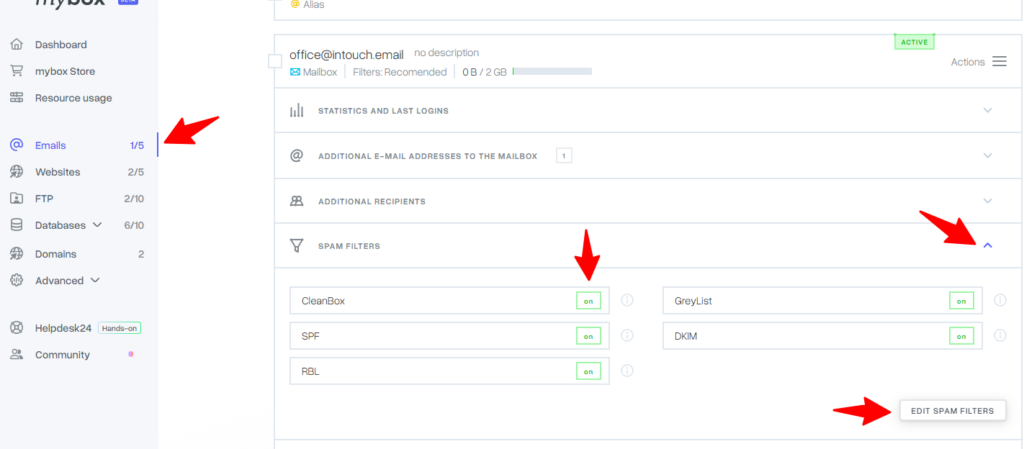
You can change the protection level in the Email section of your mybox panel.
What is CleanBox?
What is CleanBox? – 2

What CleanBox covers

CleanBox operates automatically for all mybox accounts. It does not require activation or setup. The protection level can be adjusted at any time from your panel.

Was this article helpful?

Didn't find an answer?

Our support team is here for you 24/7 – write to us and we will help you sort it out.

Helpdesk 24/7 Open a ticket in the mybox panel mybox panel Log in and manage your services

On this page

  1. How CleanBox Works
  2. Protection Levels
  3. What CleanBox covers

Related articles

All in Spam, Security & Deliverability
Explainer Spam, Security & Deliverability Why Does a Contact Form Say an Email Was Sent When Nothing Arrives? A website contact form may display a success message even though the intended recipient never receives an email. 4 min read Problem Spam, Security & Deliverability Why Can Some Recipients Receive My Emails While Others Cannot? An email sent from your domain may arrive successfully at one recipient while being rejected, delayed, or filtered by another. 4 min read Problem Spam, Security & Deliverability How to Diagnose DKIM Failures and DMARC Alignment Problems DKIM (DomainKeys Identified Mail) and DMARC (Domain-based Message Authentication, Reporting, and Conformance) help receiving mail servers verify the authenticity of incoming messages. 4 min read
mybox

Modular web hosting – free out of the box, modular to grow.

Help sections

  • Getting Started
  • Account & Billing
  • Domains & DNS
  • Hosting & Servers
  • Email
  • Security & SSL
  • WordPress & CMS
  • Grow Online

mybox

  • mybox.com
  • mybox panel
  • Webmail
  • Helpdesk 24/7
© 2026 mybox 1,680 articles