
Skip to content
mybox Help Center

Help sections

  • Getting Started
  • Account & Billing
  • Domains & DNS
  • Hosting & Servers
  • Email
  • Security & SSL
  • WordPress & CMS
  • Grow Online
mybox.com All services operational
/

Language

  • English
  • Română
  • mybox panel
  • Webmail
Start free
/
  • Getting Started
  • Account & Billing
  • Domains & DNS
  • Hosting & Servers
  • Email
  • Security & SSL
  • WordPress & CMS
  • Grow Online
  • Help Center
  • mybox.com
  • English
  • Română
All services operational Start free
  1. Help Center
  2. Getting Started
  3. Getting Started with mybox
Explainer Getting Started

What is the mybox panel and what is it for?

Updated February 23, 2026 1 min read

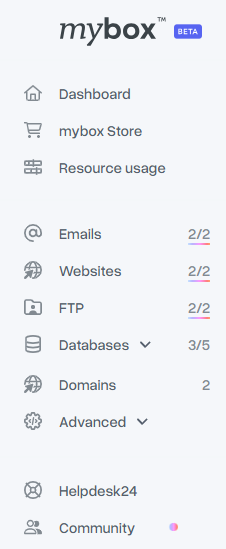
The mybox panel is your account’s control center. From the left-side menu you can manage all elements of your hosting service — websites, email, databases, resources, and support.

The panel is a proprietary mybox solution, developed in-house. This means it can be tailored to your needs without the constraints or costs of an external license.
What is the mybox panel and what is it for?

Available sections in mybox panel

Section What it does
Dashboard The main view after logging in. Shows a summary of active services, recent activity, account status, and quick access to the most important actions.
mybox Store Purchase add-ons when current limits no longer fit your needs — extra RAM, CPU, disk space, additional websites, and more.
Resource Usage Detailed insights into how your hosting resources are being used, including disk space, CPU, and RAM. Useful for tracking performance and identifying limits before they affect your website.
Email Manage everything related to email — create mailboxes, check usage, change passwords, and configure spam filtering.
Websites Add and manage websites on your account. Choose between a blank setup or automatic CMS installation. SSL certificates are also managed here — free Let’s Encrypt or a commercial option.
FTP Accounts Create, modify, and delete FTP accounts. Restrict access to a specific subdirectory — useful when giving limited access to a third party.
Databases Databases are created automatically when you add a new website, but can also be created manually. Includes user management and external IP access control.
Advanced Additional options including Redis object cache, SSH access, and CRON job configuration.
Helpdesk 24h Open a support ticket and contact the mybox support team directly from the panel.

Was this article helpful?

Didn't find an answer?

Our support team is here for you 24/7 – write to us and we will help you sort it out.

Helpdesk 24/7 Open a ticket in the mybox panel mybox panel Log in and manage your services

Related articles

All in Getting Started with mybox
How-to Getting Started with mybox How to migrate your website to mybox Step 1 — Get started with website migration Go to the Store in your mybox panel and activate the Website Migration add-on. 1 min read How-to Getting Started with mybox How to create your first website in mybox This article explains how to add a website to your mybox account. There are two paths: using the auto-installer to set up… 2 min read How-to Getting Started with mybox How to order a website to be transferred from another hosting At mybox, we provide comprehensive assistance with the transfer of websites and mailboxes from your current hosting provider. This migration process is… 2 min read
mybox

Modular web hosting – free out of the box, modular to grow.

Help sections

  • Getting Started
  • Account & Billing
  • Domains & DNS
  • Hosting & Servers
  • Email
  • Security & SSL
  • WordPress & CMS
  • Grow Online

mybox

  • mybox.com
  • mybox panel
  • Webmail
  • Helpdesk 24/7
© 2026 mybox 1,680 articles