
Where can I check the propagation status of my domain?
On this page
- What Is DNS Propagation?
- How Long Does DNS Propagation Take?
- Checking DNS Propagation
- How to Check Nameserver (NS) Propagation
- Checking Other DNS Records
- A Record
- MX Record
- TXT Record
- CNAME Record
- How to Interpret the Results
- Common Examples
- Website Migration
- Email Migration
- Nameserver Changes
- Summary
Whenever you make changes to your domain’s DNS configuration, such as updating nameservers, modifying DNS records, or pointing your website to a new server, those changes must propagate across the internet before they become visible worldwide.
This process is known as DNS propagation.
What Is DNS Propagation?
DNS propagation is the process of distributing DNS changes across DNS servers operated by internet providers and organizations around the world.
Common changes that require propagation include:
- Changing nameservers (NS records).
- Modifying A records.
- Updating MX records for email.
- Adding TXT records.
- Configuring SPF, DKIM, or DMARC records.
- Changing CNAME records.
Because DNS information is cached by various systems, changes are not visible immediately everywhere.
How Long Does DNS Propagation Take?
In most cases, DNS propagation is completed within:
Up to 24 hoursHowever, some changes may become visible much sooner, while others may take longer depending on:
- DNS cache settings.
- TTL values.
- Internet service providers.
- Regional DNS resolvers.
Checking DNS Propagation
One of the easiest ways to verify DNS propagation is by using:
This tool allows you to view DNS information reported by servers located in different regions around the world.
How to Check Nameserver (NS) Propagation
If you recently changed your domain’s nameservers:
- Open:
dnschecker.org- Enter your domain name.
Example:
yourdomain.com- From the record type dropdown menu, select:
NS- Click:
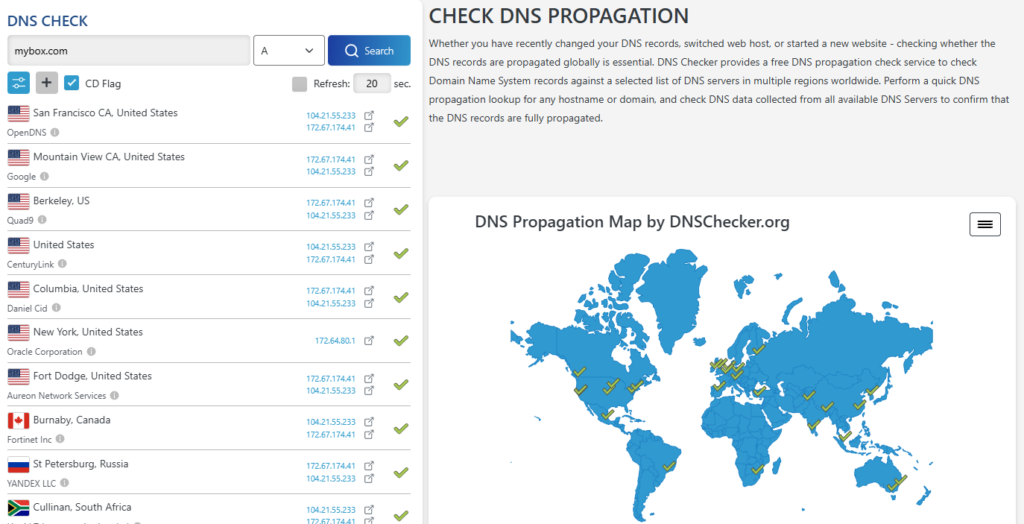
SearchThe tool will display the nameservers currently reported from multiple locations worldwide.
Checking Other DNS Records
You can also verify propagation of other record types:
A Record
Used to point a domain to a server IP address.
AMX Record
Used to determine where email is handled.
MXTXT Record
Often used for domain verification, SPF, DKIM, and DMARC.
TXTCNAME Record
Used for aliases and subdomain redirection.
CNAMEHow to Interpret the Results
If propagation is complete:
- All or most locations will display identical results.
If propagation is still in progress:
- Different locations may show different values.
- Some servers may display old records.
- Others may display the new records.
This is normal during the propagation period.
Common Examples
Website Migration
After changing an A record, some visitors may see the new website while others continue to see the old one until propagation completes.
Email Migration
After changing MX records, some email servers may still deliver messages to the previous provider until propagation finishes.
Nameserver Changes
After changing delegation to:
ns1.mybox.com
ns2.mybox.com
some DNS resolvers may continue using the old nameservers temporarily.
Summary
Any DNS-related change requires propagation before it becomes visible across the internet.
To monitor propagation:
- Visit:
- Enter your domain name.
- Select the record type you want to verify:
- NS
- A
- MX
- TXT
- CNAME
- Review the results from multiple locations worldwide.
In most cases, DNS propagation is completed within 24 hours, although many changes become visible much sooner.
Didn't find an answer?
Our support team is here for you 24/7 – write to us and we will help you sort it out.