
Where to check the statistics and the date of the last login to the e-mail box?
The mybox Panel allows you to view basic mailbox statistics, including information about recent login activity. This can be useful for monitoring mailbox usage, verifying successful logins, and identifying potentially suspicious access attempts.
1. Log in to the mybox panel, then go to the “Email” section in the menu on the left.
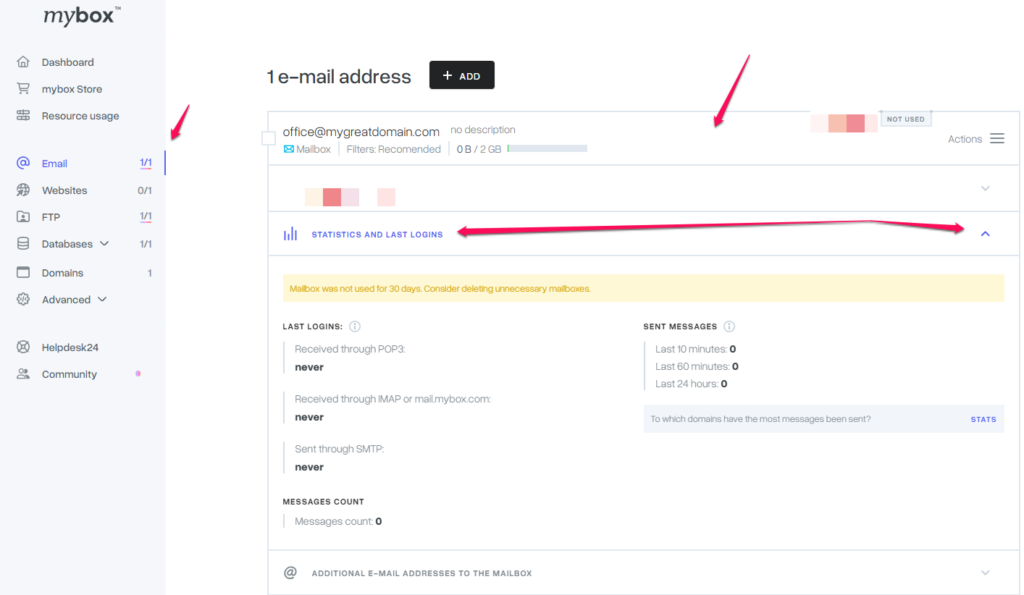
2. Select the mailbox whose data you want to check by clicking on the frame with its name.
3. Expand the “Statistics and recent logins” section
Didn't find an answer?
Our support team is here for you 24/7 – write to us and we will help you sort it out.