
Skip to content
mybox Help Center

Help sections

  • Getting Started
  • Account & Billing
  • Domains & DNS
  • Hosting & Servers
  • Email
  • Security & SSL
  • WordPress & CMS
  • Grow Online
mybox.com All services operational
/

Language

  • English
  • Română
  • mybox panel
  • Webmail
Start free
/
  • Getting Started
  • Account & Billing
  • Domains & DNS
  • Hosting & Servers
  • Email
  • Security & SSL
  • WordPress & CMS
  • Grow Online
  • Help Center
  • mybox.com
  • English
  • Română
All services operational Start free
  1. Help Center
  2. Security & SSL
  3. Website Security
Explainer Security & SSL

WordPress double verification

Updated June 2, 2026 1 min read
On this page
  1. What double verification means
  2. How it works
  3. WP 2FA plugin
  4. Practical implications
  5. Summary

WordPress does not include a built-in two-factor authentication (2FA) system by default. To add this security layer, you can use dedicated plugins that extend the login process with an additional verification step.

What double verification means

Two-factor authentication adds an extra step during login. Even if a password is correct, access is not granted until a second verification method is completed.

This significantly improves account security.

How it works

After enabling 2FA, the login process becomes:

  • enter username
  • enter password
  • complete second verification step

The second step can include:

  • a code sent via email
  • a one-time code generated by an authentication app

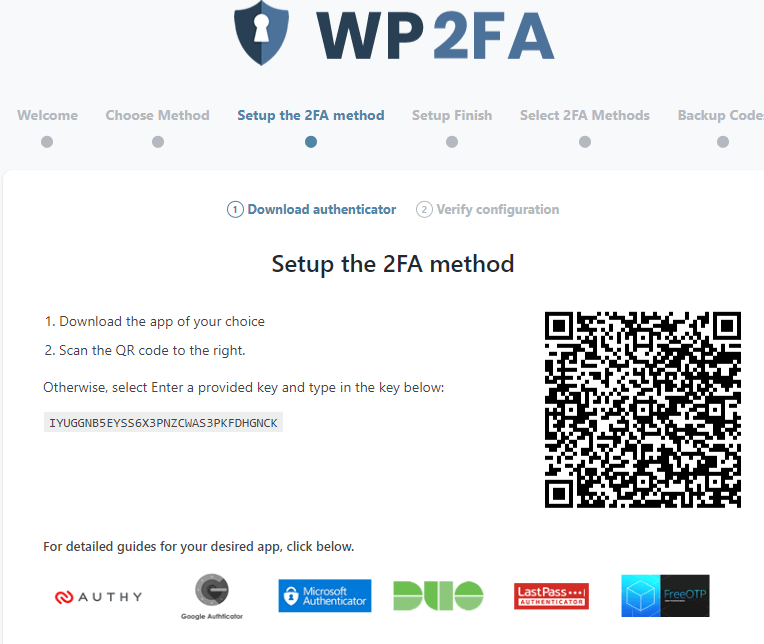
WP 2FA plugin
WordPress double verification

One of the commonly used solutions is the WP 2FA plugin.

It allows you to configure different authentication methods, such as:

  • email-based verification codes
  • authentication apps (e.g. Google Authenticator)

Depending on the configuration, users must confirm each login attempt using the selected method.

Practical implications

Enabling two-factor authentication helps:

  • reduce unauthorized login attempts
  • protect admin accounts from password leaks
  • improve overall WordPress security
  • add an extra layer of protection beyond passwords

Summary

WordPress double verification is implemented using plugins such as WP 2FA, which add an additional authentication step during login, requiring a one-time code or confirmation in addition to a password.

Was this article helpful?

Didn't find an answer?

Our support team is here for you 24/7 – write to us and we will help you sort it out.

Helpdesk 24/7 Open a ticket in the mybox panel mybox panel Log in and manage your services

On this page

  1. What double verification means
  2. How it works
  3. WP 2FA plugin
  4. Practical implications
  5. Summary

Related articles

All in Website Security
How-to Website Security How to Identify Unauthorized WordPress Administrator Accounts After a Security Incident After a WordPress security incident, an attacker may create a new administrator account to maintain access to your website. This account can… 7 min read How-to Website Security How to secure the admin panel in WordPress? In mybox.com, we offer active protection for the login panels to the “WordPress” backend. Every traffic coming to wp-login.php and wp-admin coming… 2 min read Explainer Spam, Security & Deliverability Website Abuse Monitoring Tools: A Buyer’s Guide to Malware, Form, and Outbound-Mail Detection Website abuse monitoring tools look for signals that a site, hosting account, or mailbox may be misused. Effective monitoring covers more than… 4 min read
mybox

Modular web hosting – free out of the box, modular to grow.

Help sections

  • Getting Started
  • Account & Billing
  • Domains & DNS
  • Hosting & Servers
  • Email
  • Security & SSL
  • WordPress & CMS
  • Grow Online

mybox

  • mybox.com
  • mybox panel
  • Webmail
  • Helpdesk 24/7
© 2026 mybox 1,680 articles