
Skip to content
mybox Help Center

Help sections

  • Getting Started
  • Account & Billing
  • Domains & DNS
  • Hosting & Servers
  • Email
  • Security & SSL
  • WordPress & CMS
  • Grow Online
mybox.com All services operational
/

Language

  • English
  • Română
  • mybox panel
  • Webmail
Start free
/
  • Getting Started
  • Account & Billing
  • Domains & DNS
  • Hosting & Servers
  • Email
  • Security & SSL
  • WordPress & CMS
  • Grow Online
  • Help Center
  • mybox.com
  • English
  • Română
All services operational Start free
  1. Help Center
  2. Email
  3. Mail management in the mybox panel
How-to Email

Additional email recipient

Updated June 2, 2026 1 min read
On this page
  1. How to add additional recipients
  2. 1. Open the Email section
  3. 2. Select the mailbox
  4. 3. Open “Additional recipients”
  5. Add recipients (internal)
  6. Add external recipient
  7. Practical implications
  8. Summary

In mybox, you can forward incoming emails from a mailbox to one or more additional recipients. This allows you to automatically copy messages to other internal mailboxes or external email addresses.

This feature is useful for shared inboxes, backups, or forwarding messages to external systems.

How to add additional recipients

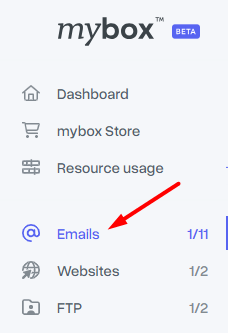
1. Open the Email section
Additional email recipient

Log in to the mybox panel and go to the Email section.

This section contains all active email accounts associated with your domain.

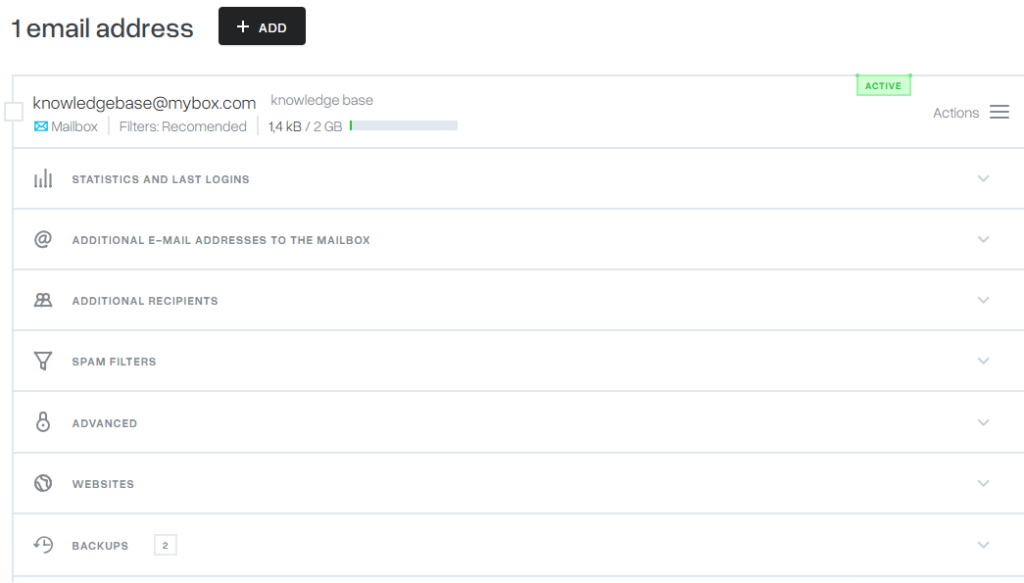
2. Select the mailbox
Additional email recipient – 2

From the list of email accounts, click the row of the mailbox you want to configure.

This will expand additional configuration options.

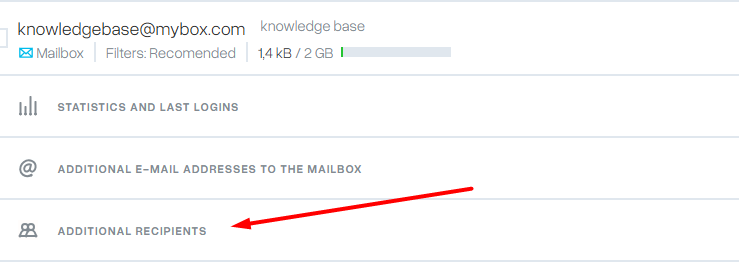
3. Open “Additional recipients”
Additional email recipient – 3

Find and expand the Additional recipients tab.

Here you will see two options:

Add recipients (internal)

Allows you to select email addresses that already exist within mybox.

These recipients will receive forwarded copies of incoming messages.

Add external recipient

Allows you to add an external email address (outside mybox).

Messages will also be forwarded to this external mailbox.

Additional email recipient – 4

Practical implications

  • forwarding works automatically for all incoming messages
  • multiple recipients can be added
  • internal and external forwarding can be combined
  • original emails remain in the main mailbox unless filtered otherwise

Summary

The “Additional recipients” feature allows forwarding emails from a mailbox to other internal or external addresses directly from the Email section in mybox, providing flexible message distribution without changing the original mailbox setup.

Was this article helpful?

Didn't find an answer?

Our support team is here for you 24/7 – write to us and we will help you sort it out.

Helpdesk 24/7 Open a ticket in the mybox panel mybox panel Log in and manage your services

On this page

  1. How to add additional recipients
  2. 1. Open the Email section
  3. 2. Select the mailbox
  4. 3. Open “Additional recipients”
  5. Add recipients (internal)
  6. Add external recipient
  7. Practical implications
  8. Summary

Related articles

All in Mail management in the mybox panel
How-to Mailbox & Webmail Management How do I import mailboxes? The mybox panel includes a built-in import tool that pulls messages from an external email account directly into a mybox mailbox. This… 1 min read How-to First Email & Domain Setup How to add a new mailbox Email accounts in mybox are tied to a domain in your account. You can create a mailbox on your own domain or… 1 min read How-to First Email & Domain Setup How to create multiple email boxes in bulk When managing a growing team on mybox, setting up communication efficiently is key. While the current mybox panel interface focuses on individual… 2 min read
mybox

Modular web hosting – free out of the box, modular to grow.

Help sections

  • Getting Started
  • Account & Billing
  • Domains & DNS
  • Hosting & Servers
  • Email
  • Security & SSL
  • WordPress & CMS
  • Grow Online

mybox

  • mybox.com
  • mybox panel
  • Webmail
  • Helpdesk 24/7
© 2026 mybox 1,680 articles