
Creating your own MySQL backup
mybox creates automatic daily backups of all databases on your account. In addition, you can create a manual backup at any time — for example, before making significant changes to your database or before updating your CMS.
Manual backups are created on demand and stored alongside automatic backup points in the same interface.
How to create a manual database backup
Step 1 — Open MySQL Databases Log in to your mybox panel and go to Databases → MySQL Databases.
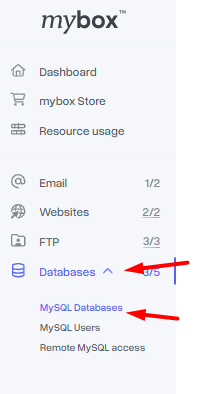
Step 2 — Select the database Click the row for the database you want to back up to expand its options, then open the Backups section. A list of available backup points for that database will appear.
Each backup point is marked with an icon indicating its origin:
| Icon | Meaning |
| Grey | Automatic backup created by mybox |
| Green | Manual backup created by you |
| Grey with padlock | On-demand backup |
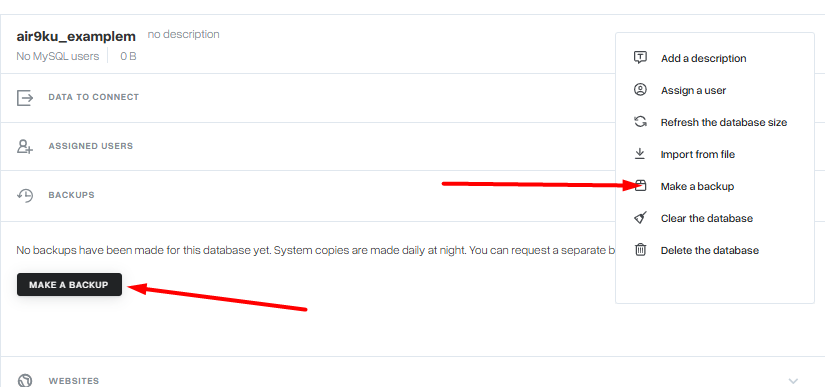
Step 3 — Create the backup Click the Back up button at the bottom of the Backups section, then confirm by clicking Make a backup.
You will see a confirmation notification in the upper right corner. Once the process completes, the new backup point will appear in the list.
Didn't find an answer?
Our support team is here for you 24/7 – write to us and we will help you sort it out.