
Skip to content
mybox Help Center

Help sections

  • Getting Started
  • Account & Billing
  • Domains & DNS
  • Hosting & Servers
  • Email
  • Security & SSL
  • WordPress & CMS
  • Grow Online
mybox.com All services operational
/

Language

  • English
  • Română
  • mybox panel
  • Webmail
Start free
/
  • Getting Started
  • Account & Billing
  • Domains & DNS
  • Hosting & Servers
  • Email
  • Security & SSL
  • WordPress & CMS
  • Grow Online
  • Help Center
  • mybox.com
  • English
  • Română
All services operational Start free
  1. Help Center
  2. Security & SSL
  3. Account & Password Security
How-to Security & SSL

How do I change my WordPress dashboard password while logged in?

Updated June 2, 2026 1 min read

If you want to change the password for your WordPress dashboard and you have the option to log in to the CMS script, all you have to do is click on “Hello, your name” in the upper right corner and select the “Edit profile” option in the first step.
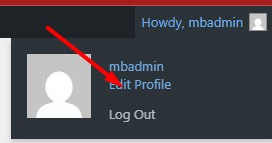
How do I change my WordPress dashboard password while logged in?

On the page that appears, scroll down to the bottom where you will see the “Set New Password” item and the “Generate Password” button. Click on this button.
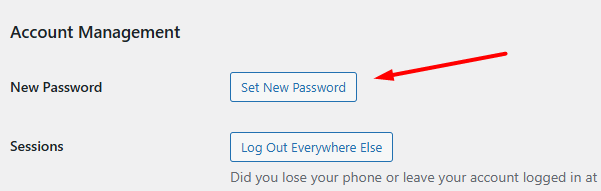
How do I change my WordPress dashboard password while logged in? – 2

WordPress will generate a random secure password for you and display it so that you can keep it safe. Of course, the password field is edited, so if necessary, you can enter another password that is more convenient and easier for you to remember.

How do I change my WordPress dashboard password while logged in? – 3

Finally, you confirm the operation by clicking on the “Update Profile” button located at the very bottom of the page.

Result

Your WordPress dashboard password will now be updated immediately. You can use the new password the next time you log in.

Was this article helpful?

Didn't find an answer?

Our support team is here for you 24/7 – write to us and we will help you sort it out.

Helpdesk 24/7 Open a ticket in the mybox panel mybox panel Log in and manage your services

Related articles

All in Account & Password Security
How-to Account & Password Security FTP client – How to take care of security? When using FTP clients to manage your website files, it is important to follow security best practices to protect your hosting account… 2 min read How-to Account & Login Management How do I set up 2FA in the mybox panel? Two-factor authentication (2FA) adds a second verification step when logging in to the mybox panel. After entering your password, the panel asks… 1 min read How-to WebMail mail.mybox.com How do I set up two-step verification in Webmail? Security is a priority today, and two-step verification, which requires not only knowing and providing a password, but also a one-time code,… 2 min read
mybox

Modular web hosting – free out of the box, modular to grow.

Help sections

  • Getting Started
  • Account & Billing
  • Domains & DNS
  • Hosting & Servers
  • Email
  • Security & SSL
  • WordPress & CMS
  • Grow Online

mybox

  • mybox.com
  • mybox panel
  • Webmail
  • Helpdesk 24/7
© 2026 mybox 1,680 articles