Skip to content
mybox Help Center

Help sections

  • Getting Started
  • Account & Billing
  • Domains & DNS
  • Hosting & Servers
  • Email
  • Security & SSL
  • WordPress & CMS
  • Grow Online
mybox.com All services operational
/

Language

  • English
  • Română
  • mybox panel
  • Webmail
Start free
/
  • Getting Started
  • Account & Billing
  • Domains & DNS
  • Hosting & Servers
  • Email
  • Security & SSL
  • WordPress & CMS
  • Grow Online
  • Help Center
  • mybox.com
  • English
  • Română
All services operational Start free
  1. Help Center
  2. Account & Billing
  3. Account & Login Management
How-to Account & Billing

How do I change/reset the mybox panel password?

Updated May 31, 2026 1 min read

If you plan to change your mybox panel access password, click on your name and surname in the upper right corner, then select “ Settings” .
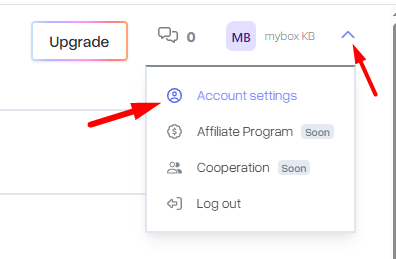
How do I change/reset the mybox panel password?

On the settings page, select the Change Password tab , then enter your current and newly chosen passwords.

Confirm the change by clicking the Change password button .
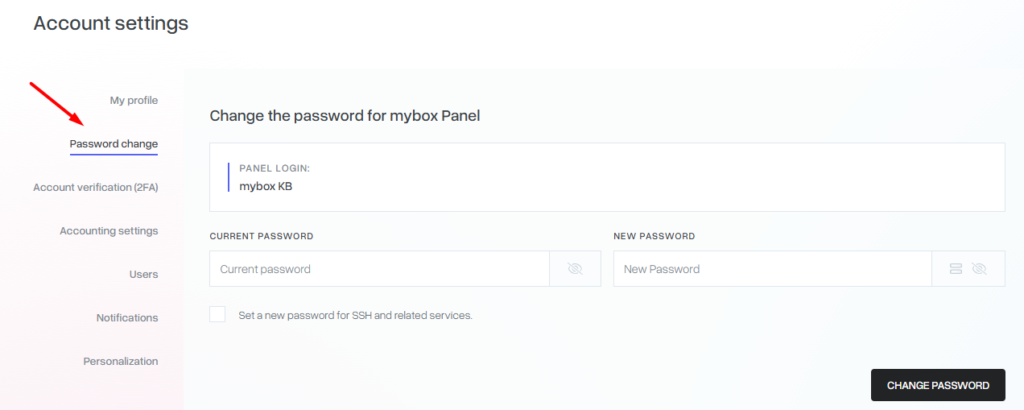
How do I change/reset the mybox panel password? – 2

If you forget your mybox panel password, there are several ways to recover it. The easiest way to recover your password is to use the password recovery option available at https://panel.mybox.com/. Click the appropriate link below the mybox panel login form. The information required to recover your password this way is:

  • account login (you can find it on invoices, among other things)
  • e-mail account
How do I change/reset the mybox panel password? – 3

Another way to recover your password is to write to us at support@mybox.com from your profile email address.

Was this article helpful?

Didn't find an answer?

Our support team is here for you 24/7 – write to us and we will help you sort it out.

Helpdesk 24/7 Open a ticket in the mybox panel mybox panel Log in and manage your services

Related articles

All in Account & Login Management
How-to Account & Login Management How do I set up 2FA in the mybox panel? Two-factor authentication (2FA) adds a second verification step when logging in to the mybox panel. After entering your password, the panel asks… 1 min read How-to Getting Started with mybox How do I log in to the mybox panel? The mybox panel is the central hub for managing your hosting account — websites, databases, email, and add-ons. Access it at panel.mybox.com. 1 min read Explainer Choosing the Right Service mybox Panel vs cPanel When choosing a hosting service, the control panel is one of the most important parts of the experience. This is where users… 11 min read
mybox

Modular web hosting – free out of the box, modular to grow.

Help sections

  • Getting Started
  • Account & Billing
  • Domains & DNS
  • Hosting & Servers
  • Email
  • Security & SSL
  • WordPress & CMS
  • Grow Online

mybox

  • mybox.com
  • mybox panel
  • Webmail
  • Helpdesk 24/7
© 2026 mybox 1,680 articles