
How do I move my website from Wix to WordPress?
Due to the fact that Wix and most similar services do not facilitate migration, moving a website created in this way, depending on its size and complexity, may turn out to be quite a difficult process, but not impossible.
To attempt to move, you need to have basic knowledge of website building and WordPress CMS support.
Below, we’re going to walk the process of transferring a simple blog page from Wix to a WordPress CMS installed on your mybox.com, so keep in mind that if you’re using a different website builder, it might look a little different.
We assume that WordPress has already been installed on your mybox.com account and you have the option to log in to the backend of the new site. If you haven’t already done so, you can find a guide HERE to help you with an automated installation.
The transfer process is divided into several steps, as you need to move blog posts separately if you also run a blog within Wix , and the so-called static pages separately.
Download blog posts from Wix

1. In a new browser tab, go to your Wix website.
2. In the address field of the browser, at the end of the address, add that you want to load blog-feed.xml, i.e. for example: https://yoursite.wixsite.com/ blog-feed.xml
If you have a blog on Wix , this link will load your entries in XML (extended markup language) format in a browser window.
Save the content to a file by pressing CTRL/CMD + S
Import an XML file into WordPress
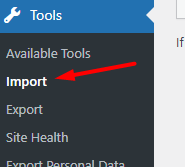
1. Log in to the “WordPress” backend, then select “Tools” from the menu on the left,
and then “Import”.
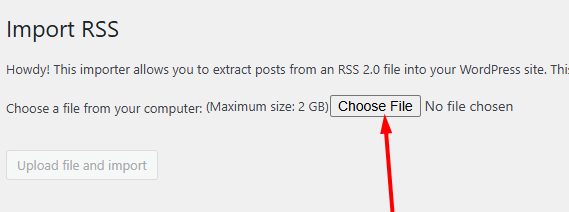
2. In the list of importers , find “RSS” and click on the “Install” link.

3. After installing the importer, click on the “Run importer” link.

4. Select the previously saved XML file from the disk and click the “Upload file to server and import it” button.
4a. If you get an error message it could mean that the importer plugin is not compatible with the PHP version you are using.
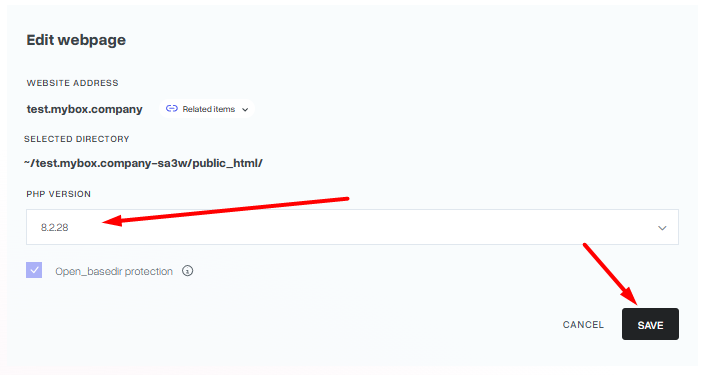
4b. To change the PHP version, log in to the myBox panel, then go to the “Websites” section, then expand the details of the selected page and click the “Edit settings” button.

4c. In the window that appears, under ” PHP Version” , select 5.6.x and click the “Save” button.
4d. Go back to the WordPress backend, select “Tools” > and “Import” from the menu, and then click on the “Start Importer” link.
4e. Select the previously saved XML file from the disk and click the “Upload file to server and import it” button.
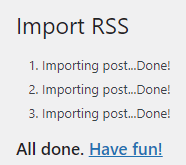
5. When the process is complete, a message similar to the one shown in the following screenshot will appear.
Remark! Keep in mind that when importing blog posts, any graphics, as long as they are displayed on the page, will still be sourced from Wix or another builder from which the import was made. Therefore, we recommend that graphics/photos be verified.
Moving static pages
In the case of static pages, such as about the company or our offer , unfortunately, it is not possible to import automatically. So, the content of this type of pages must be entered/transferred manually.
1. Log in to your WordPress backend, then go to the “Pages” section in the menu on the left, and then click “Add Page”.

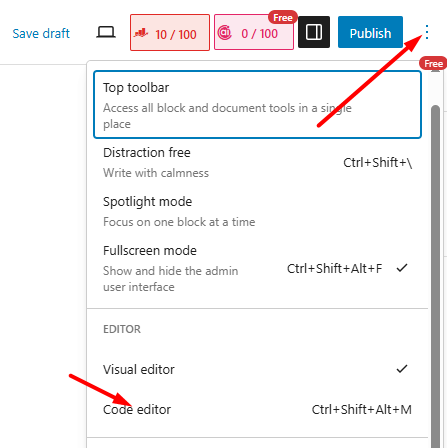
2. On the edit page that appears in the upper right corner, click on the three-dot icon, and then select the code editor view. This will ensure that the content of the page copied from Wix will not contain the formatting used there.
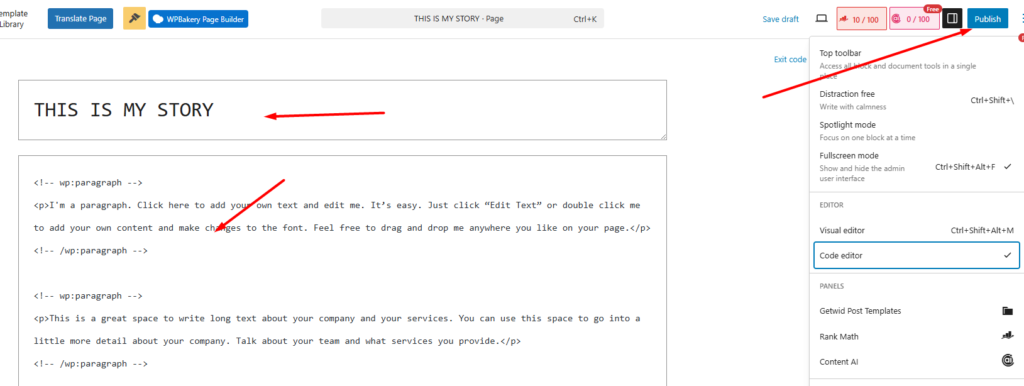
3. In a separate browser tab, open your Wix website, then select and copy the title and content of the selected page.

4. Paste on the WordPress backend page , fill in the page title field and its content, and click the “Publish” button.
Repeat the steps above until you have moved all the static pages.
Didn't find an answer?
Our support team is here for you 24/7 – write to us and we will help you sort it out.