
Skip to content
mybox Help Center

Help sections

  • Getting Started
  • Account & Billing
  • Domains & DNS
  • Hosting & Servers
  • Email
  • Security & SSL
  • WordPress & CMS
  • Grow Online
mybox.com All services operational
/

Language

  • English
  • Română
  • mybox panel
  • Webmail
Start free
/
  • Getting Started
  • Account & Billing
  • Domains & DNS
  • Hosting & Servers
  • Email
  • Security & SSL
  • WordPress & CMS
  • Grow Online
  • Help Center
  • mybox.com
  • English
  • Română
All services operational Start free
  1. Help Center
  2. Email
  3. Mailbox & Webmail Management
How-to Email

How do I receive mail from my Gmail inbox?

Updated February 5, 2026 1 min read

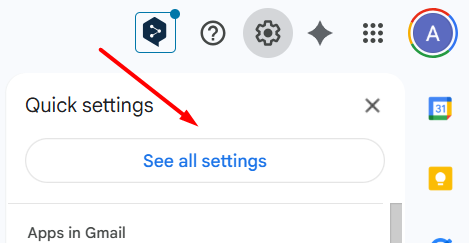
1. After logging in to “GMail” , click on the “gear icon” and then click on the “See all settings” button.
How do I receive mail from my Gmail inbox?

2. Select the “Accounts” tab.

How do I receive mail from my Gmail inbox? – 2

3. Click “Add Email Account“.

How do I receive mail from my Gmail inbox? – 3

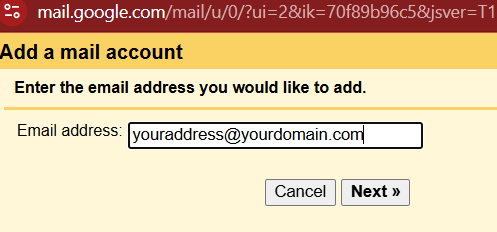
4. In the window that appears, enter the name of the mailbox and click “Next”.
How do I receive mail from my Gmail inbox? – 4

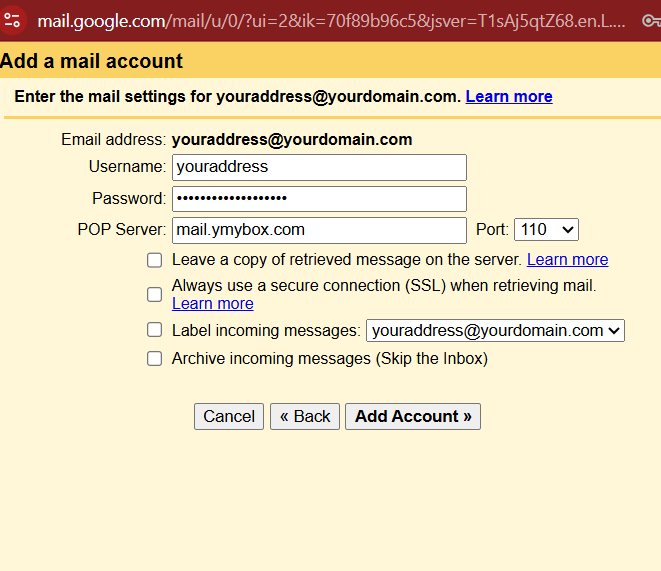
5. The next step will be to configure the defined mailbox.
How do I receive mail from my Gmail inbox? – 5
  • Username – enter the name of your mailbox,
  • Password – enter the password for the e-mail box,
  • POP server – enter pop3.mybox.com and set port 110,

Other settings can be completed as you wish.

6. If you have provided all the correct data, you will receive a confirmation of adding your account.

You can now decide whether you want to be able to send messages as an email inbox.

Was this article helpful?

Didn't find an answer?

Our support team is here for you 24/7 – write to us and we will help you sort it out.

Helpdesk 24/7 Open a ticket in the mybox panel mybox panel Log in and manage your services

Related articles

All in Mailbox & Webmail Management
How-to Mailbox & Webmail Management How do I import mailboxes? The mybox panel includes a built-in import tool that pulls messages from an external email account directly into a mybox mailbox. This… 1 min read How-to First Email & Domain Setup How to add a new mailbox Email accounts in mybox are tied to a domain in your account. You can create a mailbox on your own domain or… 1 min read How-to WebMail mail.mybox.com How to change your email password in WebMail The mailbox password can be changed directly in webmail at mail.mybox.com — without accessing the mybox panel. This is useful when the… 1 min read
mybox

Modular web hosting – free out of the box, modular to grow.

Help sections

  • Getting Started
  • Account & Billing
  • Domains & DNS
  • Hosting & Servers
  • Email
  • Security & SSL
  • WordPress & CMS
  • Grow Online

mybox

  • mybox.com
  • mybox panel
  • Webmail
  • Helpdesk 24/7
© 2026 mybox 1,680 articles

