
Skip to content
mybox Help Center

Help sections

  • Getting Started
  • Account & Billing
  • Domains & DNS
  • Hosting & Servers
  • Email
  • Security & SSL
  • WordPress & CMS
  • Grow Online
mybox.com All services operational
/

Language

  • English
  • Română
  • mybox panel
  • Webmail
Start free
/
  • Getting Started
  • Account & Billing
  • Domains & DNS
  • Hosting & Servers
  • Email
  • Security & SSL
  • WordPress & CMS
  • Grow Online
  • Help Center
  • mybox.com
  • English
  • Română
All services operational Start free
  1. Help Center
  2. Getting Started
  3. First Email & Domain Setup
How-to Getting Started

How do I send emails on my domain through gmail.com

Updated February 6, 2026 1 min read

When you plan to receive messages from your domain’s mailbox and reply to them by identifying yourself with your domain using the gmail.com app, you just need to follow a few steps.

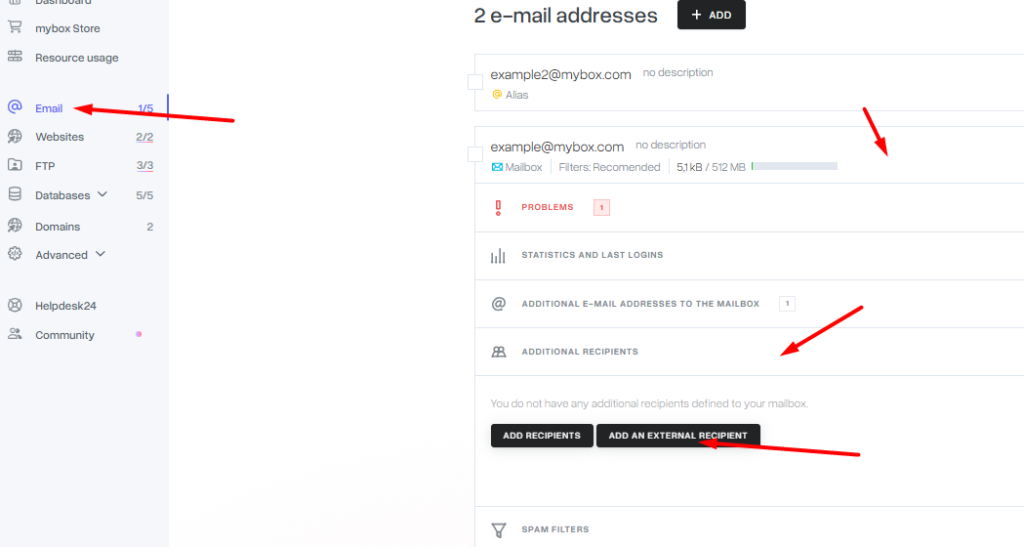
1. From the myBox panel level, go to the “E-mail” section, and after selecting the mailbox, expand its details and click on the option to add an external recipient.
There, enter the address of your mailbox on the gmail.com where emails from the indicated mailbox will be forwarded.
How do I send emails on my domain through gmail.com

2. Then log in to the gmail.com box and go to the “Accounts” section in the settings and under “Send as” select to add a different email address.

How do I send emails on my domain through gmail.com – 2

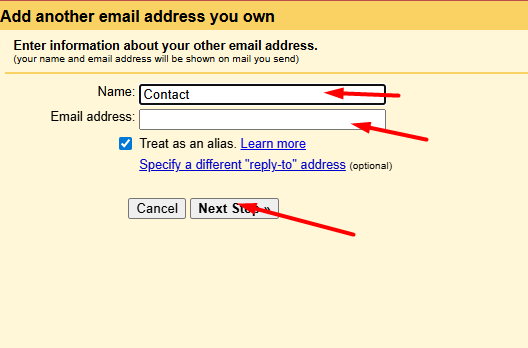
3. In the box that appears, enter a friendly name for you, e.g. Contact and the email address in your domain, then click the “Next” button.
How do I send emails on my domain through gmail.com – 3

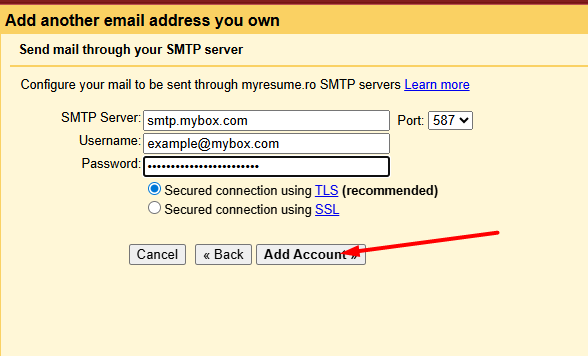
4. On the next page, fill in the details as if you were setting up an email client application. This step is used so that you can send emails from gmail.com identifying yourself with your own mailbox. Make sure that the SMTP server field has the address: smtp.mybox.com, the port is set to 587 , and the TLS option is checked.

The full name of your mybox.com box and the password that was set for it when creating it are used as a login.
How do I send emails on my domain through gmail.com – 4

After clicking on the “Add account” button, you will receive a message from the gmail.com address in the mybox.com inbox verifying that it belongs to you. Once approved, you will be able to send messages.

Was this article helpful?

Didn't find an answer?

Our support team is here for you 24/7 – write to us and we will help you sort it out.

Helpdesk 24/7 Open a ticket in the mybox panel mybox panel Log in and manage your services

Related articles

All in First Email & Domain Setup
How-to First Email & Domain Setup How to add a new mailbox Email accounts in mybox are tied to a domain in your account. You can create a mailbox on your own domain or… 1 min read How-to First Email & Domain Setup Configuring Thunderbird 1. When you want to add another email account to Mozilla Thunderbird, click on any account, then a tab will appear where… 2 min read How-to First Email & Domain Setup How to configure the email client An email client is an application used to send and receive email — such as Outlook, Thunderbird, or Apple Mail. To connect… 1 min read
mybox

Modular web hosting – free out of the box, modular to grow.

Help sections

  • Getting Started
  • Account & Billing
  • Domains & DNS
  • Hosting & Servers
  • Email
  • Security & SSL
  • WordPress & CMS
  • Grow Online

mybox

  • mybox.com
  • mybox panel
  • Webmail
  • Helpdesk 24/7
© 2026 mybox 1,680 articles