
Skip to content
mybox Help Center

Help sections

  • Getting Started
  • Account & Billing
  • Domains & DNS
  • Hosting & Servers
  • Email
  • Security & SSL
  • WordPress & CMS
  • Grow Online
mybox.com All services operational
/

Language

  • English
  • Română
  • mybox panel
  • Webmail
Start free
/
  • Getting Started
  • Account & Billing
  • Domains & DNS
  • Hosting & Servers
  • Email
  • Security & SSL
  • WordPress & CMS
  • Grow Online
  • Help Center
  • mybox.com
  • English
  • Română
All services operational Start free
  1. Help Center
  2. Getting Started
  3. First Email & Domain Setup
Explainer Getting Started

Microsoft Outlook 2016-2019 Configuration

Updated February 12, 2026 1 min read

To add an email inbox in Outlook 2016 or 2019, in the first step, type the name of your mailbox in the Email address field, and then check the Allow me to set up my account manually box. Once you’re doing this, click the Connect button.
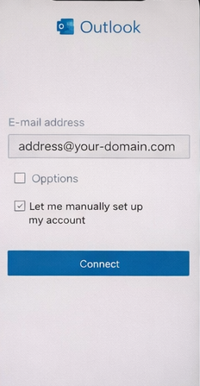
Microsoft Outlook 2016-2019 Configuration

At this point, the program will ask you what type of mailbox you want to set up. Select IMAP.
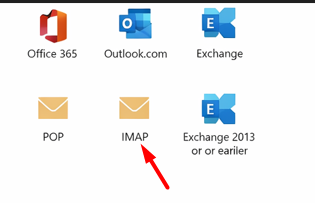
Microsoft Outlook 2016-2019 Configuration – 2

In this step, we need to specify the names of the mail hosts and the ports on which the communication will take place. So we fill in the following:

Incoming mail: imap.mybox.com
Incoming mail port: 993
Encryption method: SSL/TLS

Outgoing Mail: smtp.mybox.com
Outgoing Mail Port: 587
Encryption Method: SSL/TLS or STARTTLS

In either case, we recommend that you check the authentication requirement option.

Once you have filled in the required fields, click Next.
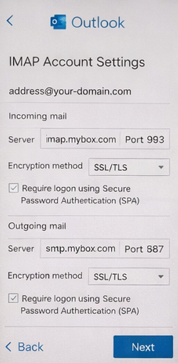
Microsoft Outlook 2016-2019 Configuration – 3

Now the program will ask you for the password to the box. Enter the password that matches the one you set when you created the mailbox in the mybox panel and click the Connect button.
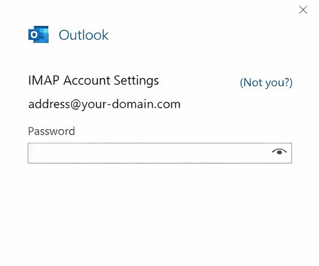
Microsoft Outlook 2016-2019 Configuration – 4

That’s all. If there is correct communication with the server, you will receive information that the account/mailbox has been added successfully.
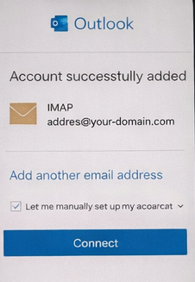
Microsoft Outlook 2016-2019 Configuration – 5

Was this article helpful?

Didn't find an answer?

Our support team is here for you 24/7 – write to us and we will help you sort it out.

Helpdesk 24/7 Open a ticket in the mybox panel mybox panel Log in and manage your services

Related articles

All in First Email & Domain Setup
How-to First Email & Domain Setup How to add a new mailbox Email accounts in mybox are tied to a domain in your account. You can create a mailbox on your own domain or… 1 min read How-to First Email & Domain Setup Configuring Thunderbird 1. When you want to add another email account to Mozilla Thunderbird, click on any account, then a tab will appear where… 2 min read How-to First Email & Domain Setup How to configure the email client An email client is an application used to send and receive email — such as Outlook, Thunderbird, or Apple Mail. To connect… 1 min read
mybox

Modular web hosting – free out of the box, modular to grow.

Help sections

  • Getting Started
  • Account & Billing
  • Domains & DNS
  • Hosting & Servers
  • Email
  • Security & SSL
  • WordPress & CMS
  • Grow Online

mybox

  • mybox.com
  • mybox panel
  • Webmail
  • Helpdesk 24/7
© 2026 mybox 1,680 articles