
Skip to content
mybox Help Center

Help sections

  • Getting Started
  • Account & Billing
  • Domains & DNS
  • Hosting & Servers
  • Email
  • Security & SSL
  • WordPress & CMS
  • Grow Online
mybox.com All services operational
/

Language

  • English
  • Română
  • mybox panel
  • Webmail
Start free
/
  • Getting Started
  • Account & Billing
  • Domains & DNS
  • Hosting & Servers
  • Email
  • Security & SSL
  • WordPress & CMS
  • Grow Online
  • Help Center
  • mybox.com
  • English
  • Română
All services operational Start free
  1. Help Center
  2. Account & Billing
  3. Account & Login Management
Explainer Account & Billing

What are related elements?

Updated March 19, 2026 1 min read
On this page
  1. Distinction Block
  2. Practical Implications

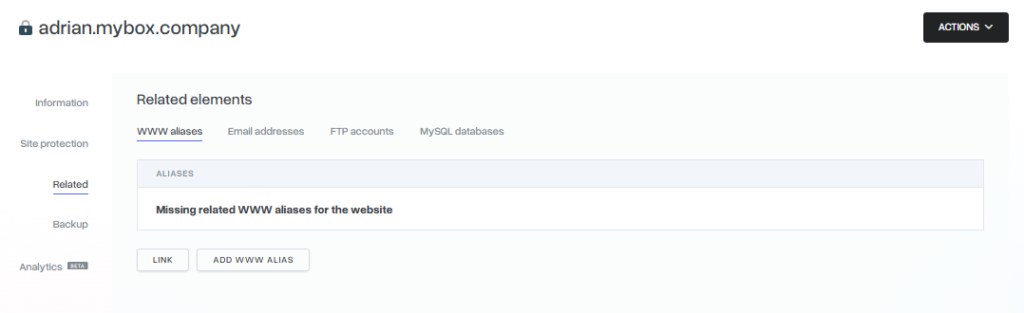
In mybox, related elements are a structural way to organize your services by linking FTP accounts, MySQL databases, email addresses, and web aliases to a specific website.

Linking these elements does not affect how your website functions technically; it is a management tool designed to keep your dashboard organized, especially when managing multiple projects.

How it works

When you create a new website using the Advanced option, you can choose to create an associated FTP account and MySQL database simultaneously. Once created, the login credentials for these elements are accessible directly through the website’s management view.

You can also link existing elements at any time. For example, if you have an email address used specifically for a certain project, associating it with that website allows you to see all relevant services in one place.

Distinction Block

Link ≠ Dependency Creating a link is not required for your website to work. If you delete a website, the related elements (databases, FTP, or email) are not deleted. They remain active in your account but will no longer be “tagged” to that website.

Practical Implications

  • Centralized Management: In the Websites tab, selecting a specific page allows you to see all associated FTP accounts, databases, and aliases under their respective tabs.
  • Quick Actions: From the associated tabs, you can directly change passwords, modify access paths, or create new linked accounts without navigating through different sections of the dashboard.
  • Scalability: This feature is most useful if you manage a large number of databases or accounts, as it allows you to filter and find credentials based on the project they belong to.
  • Flexibility: You can add, change, or remove these associations at any time without risking service downtime.
What are related elements?

Summary
Related elements are an organizational layer in the mybox dashboard. They allow you to group separate infrastructure components—like email and databases—under a single website for easier navigation and management.

Was this article helpful?

Didn't find an answer?

Our support team is here for you 24/7 – write to us and we will help you sort it out.

Helpdesk 24/7 Open a ticket in the mybox panel mybox panel Log in and manage your services

On this page

  1. Distinction Block
  2. Practical Implications

Related articles

All in Account & Login Management
How-to Account & Login Management How do I set up 2FA in the mybox panel? Two-factor authentication (2FA) adds a second verification step when logging in to the mybox panel. After entering your password, the panel asks… 1 min read How-to Getting Started with mybox How do I log in to the mybox panel? The mybox panel is the central hub for managing your hosting account — websites, databases, email, and add-ons. Access it at panel.mybox.com. 1 min read Explainer Choosing the Right Service mybox Panel vs cPanel When choosing a hosting service, the control panel is one of the most important parts of the experience. This is where users… 11 min read
mybox

Modular web hosting – free out of the box, modular to grow.

Help sections

  • Getting Started
  • Account & Billing
  • Domains & DNS
  • Hosting & Servers
  • Email
  • Security & SSL
  • WordPress & CMS
  • Grow Online

mybox

  • mybox.com
  • mybox panel
  • Webmail
  • Helpdesk 24/7
© 2026 mybox 1,680 articles